You can download it from this link:
https://cdn.tradingfinder.com/file/5...4-by-tflab.zip
 You can also access the MetaTrader 5 version of this Indicator through this page:
https://www.cryptocraft.com/thread/1...-for-mt5-tflab
 For instructions on how to install:
https://www.forexfactory.com/thread/...-in-metatrader
Prop Firm DrawDown Protector : Prop Firm Capital Protection Expert MT4 | Forex Money Management: Forex Trade Management Expert MT4 |ICT Concepts Indicator MT4 | Smart Money Concepts Expert MT4| Smart Money Trap Scanner | Get a free Expert Advisor license via Telegram and WhatsApp
Key Features of the MSP Trading Indicator
Acting as a professional financial market expert, here is a summary of the indicator's main characteristics:
- Indicator Categories:
- Signal and Forecast MT4 Indicators
- Trading Assist MT4 Indicators
- Momentum Indicators in MT4
- Platforms:
- MetaTrader 4 Indicators
- Trading Skills:
- Suitable for Elementary skill levels
- Indicator Types:
- Reversal MT4 Indicators
- Timeframe:
- Multi-Timeframe MT4 Indicators
- Trading Style:
- Intraday MT4 Indicators
- Trading Instruments:
- Share Stocks MT4 Indicators
- Indices Market MT4 Indicators
- Commodity Market MT4 Indicators
- Stock Market MT4 Indicators
- Cryptocurrency MT4 Indicators
- Forex MT4 Indicators
How the MSP Indicator Works
The foundational logic of the MSP Indicator is based on the Average True Range (ATR), utilizing a standard 14-period setting. It calculates the average price fluctuation range by considering the High and Low values of previous candles. This core mechanism enables the indicator to generate precise trade signals:
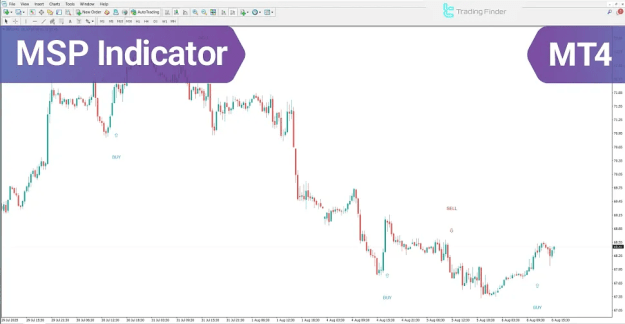
- Buy Signal: A blue arrow and a "BUY" text signal are generated when the current price surpasses the calculated ATR average, indicating the potential start of an uptrend and reinforced buying momentum.
- Sell Signal: A red arrow and a "SELL" text signal are generated when the current price falls below the calculated ATR average, suggesting increased selling pressure and a potential bearish trend initiation.
Trading with the MSP Indicator
The MSP Indicator provides clear visual cues for optimal trade entry points, capitalizing on momentum shifts.
Uptrend Initiation Analysis
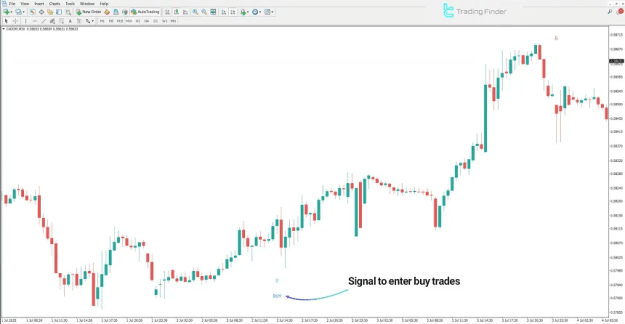
- Scenario: Currency Pair CAD/CHF on a 30-minute timeframe.
- Signal: The appearance of the blue, upward-pointing arrow with the accompanying "BUY" text.
- Interpretation: This signal confirms the potential commencement of a new uptrend and signifies a strengthening of buyer momentum.
- Strategy: Executing a buy trade immediately following the signal trigger is considered an effective entry strategy in this scenario.
Downtrend Initiation Analysis
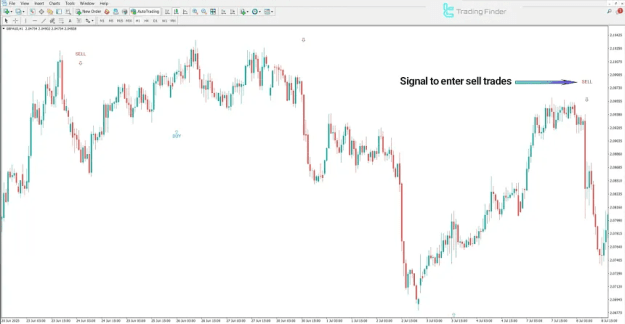
- Scenario: Currency Pair GBP/AUD on a 1-hour timeframe.
- Signal: The display of the red, downward-pointing arrow with the accompanying "SELL" text.
- Interpretation: This signal indicates significant seller pressure and forecasts the probable start of a bearish trend.
- Strategy: The indicator establishes a favorable zone for short entries (sell trades).
 Understanding MSP Indicator Settings
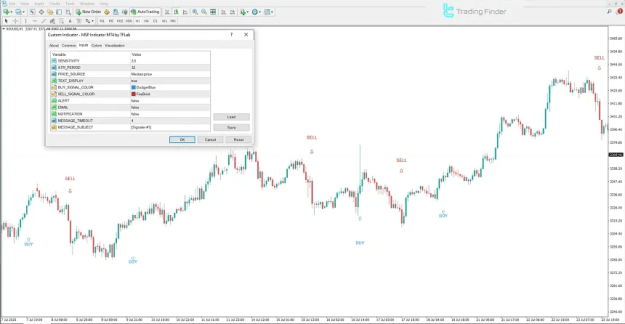
The indicator is highly customizable via the settings panel within the MetaTrader 4 platform, allowing traders to fine-tune its performance:
- SENSITIVITY: Adjusts the indicator's responsiveness to dynamic market changes.
- ATR_PERIOD: Specifies the period used for the ATR average calculation (default is 14).
- PRICE_SOURCE: Determines the type of price data used in calculations (e.g., Close, High/Low, etc.).
- TEXT_DISPLAY: Toggles the visibility of signal texts ("BUY" and "SELL") on the chart.
- BUY_SIGNAL_COLOR: Sets the color for the Buy signal elements.
- SELL_SIGNAL_COLOR: Sets the color for the Sell signal elements.
- ALERT: Enables audible or visual alerts upon signal generation.
- EMAIL: Allows the sending of signal alerts via email.
- NOTIFICATION: Enables sending notifications (e.g., mobile push notifications).
- MESSAGE_TIMEOUT: Controls the display duration of alert messages.
- MESSAGE_SUBJECT: Customizes the subject line text for alert messages.
Conclusion
The MSP Indicator serves as an invaluable resource for professional traders, enabling them to execute trades with precision by rapidly detecting crucial momentum shifts right at the onset of bullish and bearish trends. The "BUY" signal confirms buying pressure, while the "SELL" signal confirms selling power, providing clear, actionable insights into market direction.