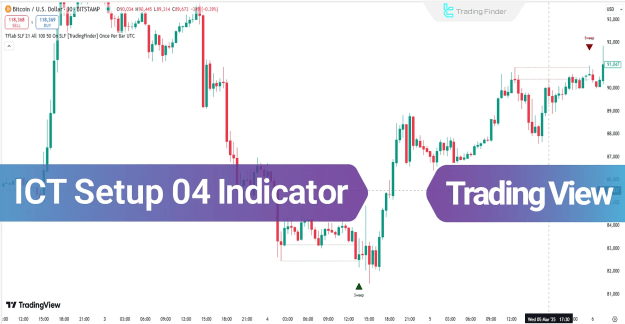
The ICT Setup 04 Indicator is a sophisticated trading tool designed to operate on the TradingView platform. It incorporates smart money and liquidity concepts to identify pivotal swing points and illuminate reactive trading zones. By utilizing structural and candlestick filters, this indicator is adept at detecting fake breakouts and aligning trading signals with prevailing institutional order flow. It highlights key reversal areas with distinct green and red arrows, signaling a liquidity sweep of a previous high or low.
You can access the Indicator from this link:
https://tradingfinder.com/products/i.../ict-setup-04/
You can access the Indicator on the TradingView website:
https://de.tradingview.com/script/O0...ake-CHoCH-BOS/
Prop Firm DrawDown Protector : Prop Firm Capital Protection Expert MT4 | Forex Money Management: Forex Trade Management Expert MT4 |ICT Concepts Indicator MT4 | Smart Money Concepts Expert MT4| Smart Money Trap Scanner | Get a free Expert Advisor license via Telegram and WhatsApp
ICT Setup 04 Indicator Overview
This indicator operates by first identifying significant price swings. It then awaits a market move where the price briefly fakes a breakout of these levels before entering a designated smart reactive zone. A potential entry zone is signaled when a confirmation candle, such as a Doji or a small-bodied candle, closes within this reactive zone, confirming the fake breakout.
Uptrend Scenario
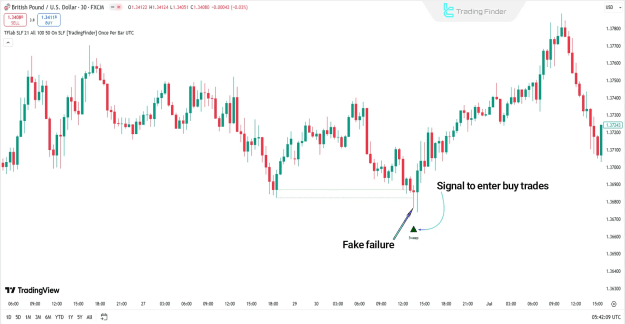
Following a downtrend, a buy signal is generated when the price sweeps the previous swing low, taking out sell-side liquidity, and re-enters the reactive zone between those levels. The formation of a Doji candle that closes back above the liquidity level indicates a failure of sellers to sustain the price below the key zone, suggesting a high-probability reversal.
Downtrend Scenario
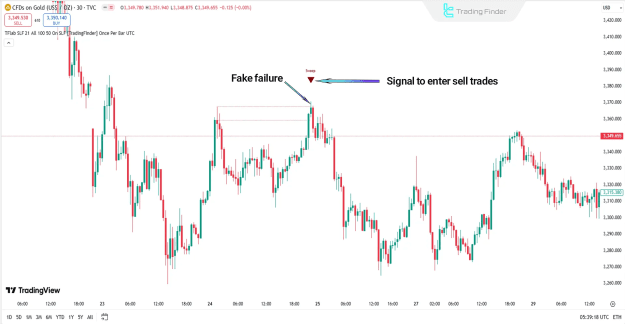
Conversely, in an uptrend, a sell signal is triggered after the price surpasses the previous swing high and moves into the reactive zone, sweeping buy-side liquidity. A candle with a long upper wick and a small body serves as a classic indication of a fake breakout, suggesting that buyers are losing control and a downward move is imminent.
ICT Setup 04 Indicator Settings
The ICT Setup 04 Indicator offers a customizable settings panel for traders to fine-tune its performance.
You can access the Indicator from this link:
https://tradingfinder.com/products/i.../ict-setup-04/
You can access the Indicator on the TradingView website:
https://de.tradingview.com/script/O0...ake-CHoCH-BOS/
Prop Firm DrawDown Protector : Prop Firm Capital Protection Expert MT4 | Forex Money Management: Forex Trade Management Expert MT4 |ICT Concepts Indicator MT4 | Smart Money Concepts Expert MT4| Smart Money Trap Scanner | Get a free Expert Advisor license via Telegram and WhatsApp
ICT Setup 04 Indicator Overview
This indicator operates by first identifying significant price swings. It then awaits a market move where the price briefly fakes a breakout of these levels before entering a designated smart reactive zone. A potential entry zone is signaled when a confirmation candle, such as a Doji or a small-bodied candle, closes within this reactive zone, confirming the fake breakout.
Uptrend Scenario
Following a downtrend, a buy signal is generated when the price sweeps the previous swing low, taking out sell-side liquidity, and re-enters the reactive zone between those levels. The formation of a Doji candle that closes back above the liquidity level indicates a failure of sellers to sustain the price below the key zone, suggesting a high-probability reversal.
Downtrend Scenario
Conversely, in an uptrend, a sell signal is triggered after the price surpasses the previous swing high and moves into the reactive zone, sweeping buy-side liquidity. A candle with a long upper wick and a small body serves as a classic indication of a fake breakout, suggesting that buyers are losing control and a downward move is imminent.
ICT Setup 04 Indicator Settings
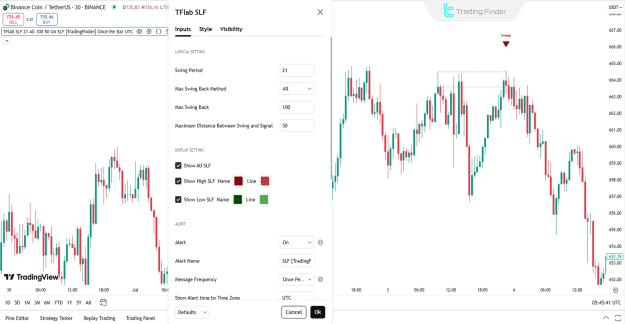
The ICT Setup 04 Indicator offers a customizable settings panel for traders to fine-tune its performance.
- LOGICAL SETTINGS
- Swing Period: Defines the period for swing detection.
- Max Swing Back Method: Sets the method for calculating the maximum allowable swing back.
- Max Swing Back: Specifies the maximum permitted swing back.
- Maximum Distance Between Swing and Signal: Dictates the maximum distance between a swing point and the signal trigger.
- DISPLAY SETTINGS
- Show All SLF: Toggles the visibility of all SLF (Smart Liquidity Flow) levels.
- Show High SLF: Toggles the visibility of the upper SLF.
- Show Low SLF: Toggles the visibility of the lower SLF.
- ALERT
- Alert: Enables trading alerts for the indicator.
- Alert Name: Allows for a custom name for the alert.
- Message Frequency: Sets the repetition interval for alert messages.
- Show Alert time by Time Zone: Displays the alert time based on the selected time zone.
Conclusion
The ICT Setup 04 Indicator is a powerful analytical trading tool that effectively combines swing analysis, liquidity sweep detection, and candlestick behavior to identify high-probability reversal zones and pinpoint precise entry levels. By intelligently integrating market structure confirmation with price action, it significantly helps traders avoid false breakouts and keeps their trades aligned with the direction of smart money movement.
Attached Image(s) (click to enlarge)