You can access the Indicator from this link:
https://tradingfinder.com/products/i...oney-setup-02/
You can access the Indicator on the TradingView website:
https://www.tradingview.com/script/O...ajor-OB-Proof/
Prop Firm DrawDown Protector : Prop Firm Capital Protection Expert MT5 |Forex Money Management: Forex Trade Management Expert MT5 | ICT Concepts Indicator MT5 |Smart Money Concepts Expert MT5 | Smart Money Trap Scanner |Get a free Expert Advisor license via Telegram and WhatsApp
Features of the SMC Setup 02 Indicator
This indicator helps traders pinpoint optimal entry and exit points by analyzing smart money behavior.
- Indicator Categories: It falls under ICT Tradingview Indicators, Smart Money Tradingview Indicators, and Supply & Demand Tradingview Indicators.
- Platforms: Specifically designed for TradingView Indicators.
- Trading Skills: Geared towards traders with advanced skills.
- Indicator Types: Primarily a Reversal Tradingview Indicator.
- Timeframes: Applicable across multiple timeframes, including M1-M5, M15-M30, and H1-H4.
- Trading Styles: Ideal for Intraday Tradingview Indicators.
- Trading Instruments: Works on various markets, including Forex, Cryptocurrency, Commodity, and Share Stocks.
A Closer Look at the Smart Money Setup 02 Indicator
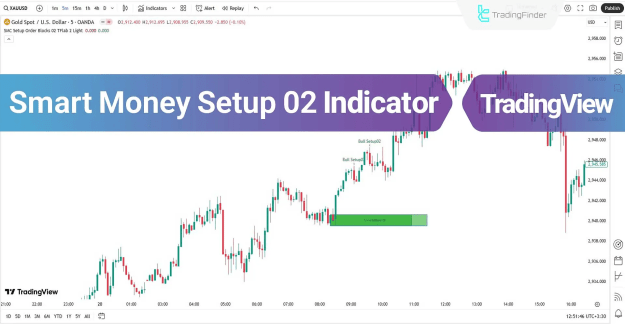
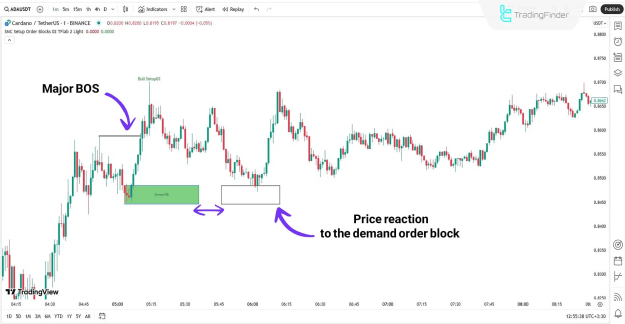
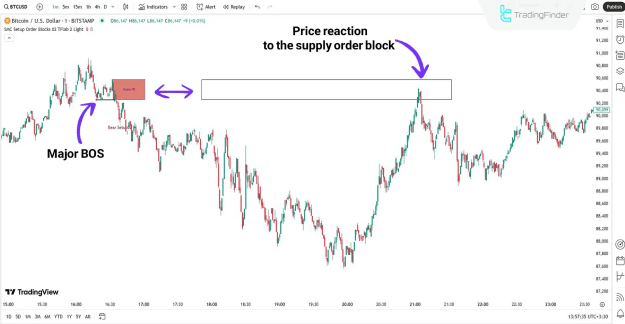
The indicator visually highlights order block (OB) zones with colored boxes. Green boxes signify demand order blocks, while red boxes represent supply order blocks.
Demand Order Blocks
On a 1-minute chart, a demand order block that forms before a Major Break of Structure is considered highly valid. The price often bounces off this zone and continues its upward movement, offering a potential buying opportunity.
Supply Order Blocks
For a downtrend, a supply order block is plotted after a Major Break of Structure. The price may retrace to this zone before resuming its bearish trend. This interaction provides an ideal opportunity for traders to enter short (sell) positions.
Customizing the Smart Money Setup 02 Indicator
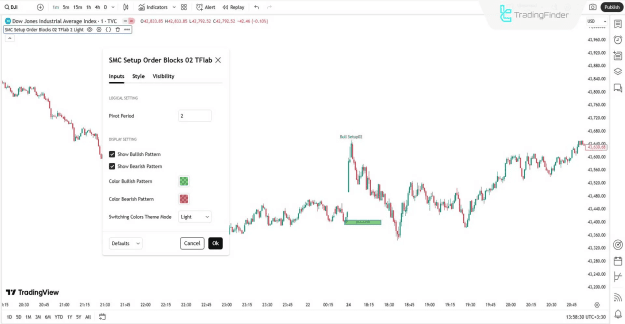
The indicator offers several customization options to suit individual trading preferences.
Logical Settings
- Pivot Period: This setting allows you to adjust the calculation of pivot periods, which is crucial for the indicator's core logic.
Display Settings
- Show Bullish Pattern: Enables the display of bullish setups on the chart.
- Show Bearish Pattern: Enables the display of bearish setups.
- Color Bullish Pattern: Allows you to define the color for demand order blocks.
- Color Bearish Pattern: Lets you define the color for supply order blocks.
- Switching Colors Theme Mode: Adjusts the background theme of the indicator to match your TradingView chart theme.
Conclusion
The Smart Money Setup 02 Indicator is a valuable tool developed from the Smart Money trading concept. It precisely identifies and plots valid order blocks before a Major Break of Structure, making it an effective supply and demand indicator. By highlighting these key zones as colored boxes, it aids in trend direction analysis and the identification of potential reversal zones.