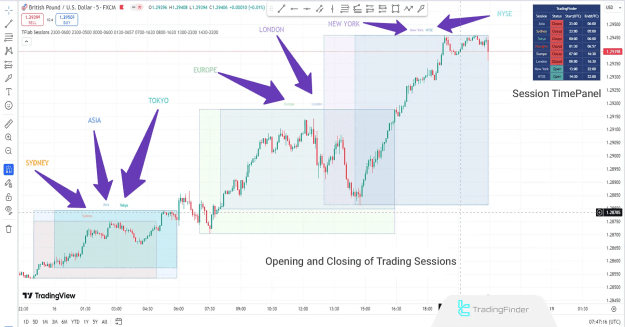
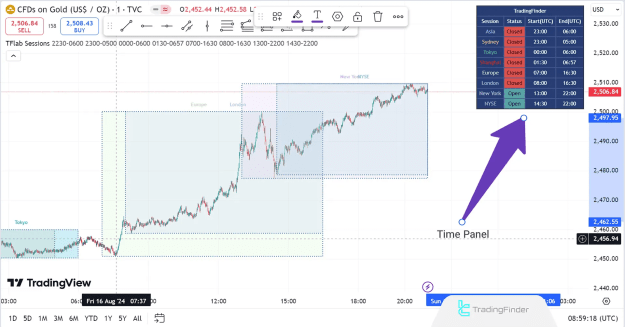
By using a time panel at the top-left corner of the chart, traders can quickly identify active trading sessions, optimize entries, and capitalize on periods of high liquidity and volatility.
You can access the Indicator from this link:
https://tradingfinder.com/products/i...orex-sessions/
You can access the Indicator on the TradingView website:
https://www.tradingview.com/script/4...-Sydney-Forex/
Prop Firm DrawDown Protector : Prop Firm Capital Protection Expert MT4 | Forex Money Management: Forex Trade Management Expert MT4 |ICT Concepts Indicator MT4 | Smart Money Concepts Expert MT4| Smart Money Trap Scanner | Get a free Expert Advisor license via Telegram and WhatsApp
How the Forex Sessions Indicator Works
Session-Based Market Analysis
The indicator highlights different trading sessions using colored rectangles on the price chart, allowing traders to:
- Identify peak trading hours.
- Adjust strategies based on session overlaps.
- Avoid low-liquidity periods.
Key Trading Sessions
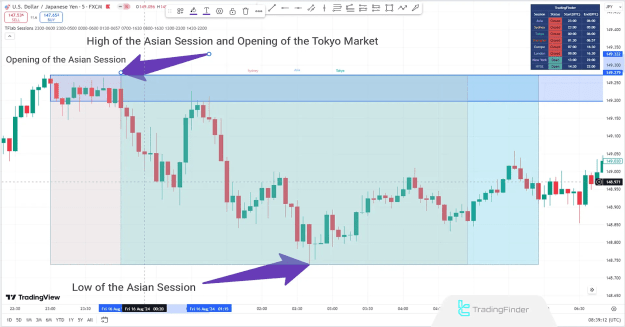
1. Asia Session (ASIA)
- Major Markets: Shanghai Stock Exchange (SSE), Tokyo.
- Active Pairs: JPY, AUD, NZD.
- Characteristics: Lower volatility compared to London and New York sessions.
The highs and lows of the Asia session often influence European market movements, making it crucial for intraday traders.
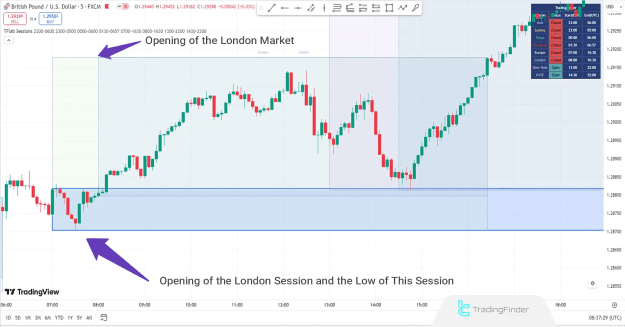
2. London Session
- Starts at 8:30 AM (Frankfurt Opening).
- Peak Activity at 9:30 AM (London Stock Exchange Opening).
- High Liquidity: Ideal for trading GBP, EUR, and CHF pairs.
3. U.S. Session
- Begins at 8:00 AM (New York Opening).
- Peak at 9:30 AM (NYSE Opening).
- Best for Futures & High-Volume Trading: The London-New York overlap provides the highest volatility.
Key Features of the Indicator
1. Session Time Panel
- Displays real-time market openings and closings.
- Helps traders track session strengths and weaknesses.
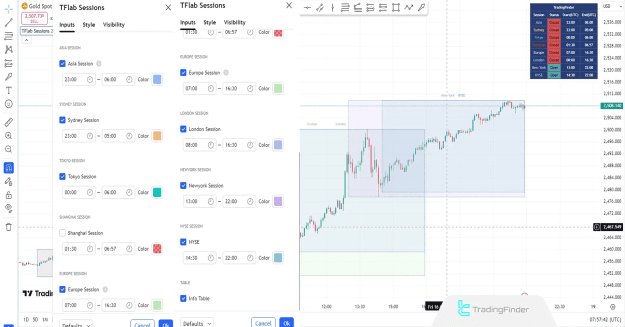
2. Customizable Settings
- Toggle Sessions On/Off: Asia, Sydney, Tokyo, Shanghai, Europe, London, New York, NYSE.
- Adjust Session Times: Set custom opening and closing hours.
- Color Customization: Modify session range colors for better visibility.
3. Multi-Timeframe Compatibility
- Works on M1-M5 (scalping) and M15-M30 (intraday trading).
- Suitable for forex, indices, and stock traders.
Why Traders Use the Forex Sessions Indicator
- Optimizes Trade Timing: Enter during high-liquidity sessions.
- Avoids Choppy Markets: Identifies low-activity periods.
- Enhances Strategy: Aligns trades with session-specific behaviors.
Conclusion
The Forex Sessions Indicator is a must-have tool for traders who rely on market timing, volume analysis, and session-based strategies. By clearly marking session boundaries and providing a real-time panel, it helps traders make data-driven decisions and maximize opportunities during peak market hours.
Whether you're a scalper, day trader, or swing trader, integrating this indicator into your TradingView charts can significantly improve your trading efficiency.