Ok that is a wise decision. I thought we have good brokers in the UK. Anyway I don't trust any broker and that's why I don't recommend any. Wish you all the best.
Ignored
Thanks, you too friend.
Faith ends where worry begins, and worry ends where faith begins.
Did you fill SL and TP in pips or with price, like: 1,3069? Forget to mention, you should fill the price.
Ignored
Okay been playing with the Incognito Mod EA and seems to be working good so far. I will continue to test and see what I come up with. There are a handful of changes that I would like to do to make it easier like instead of inputting the price in the script I can change it to pips, etc. Like stated I will continue to test this and wait for the close_positions EA first, so we can close this chapter before moving on. Thanks Kis.
Faith ends where worry begins, and worry ends where faith begins.
Brother your last verson Ea is working fine in some currency and in some currency it is not exiting properly. I put diff magic no in diff chart., Kindly see the image. Please rectify it.
Brother your last verson Ea is working fine in some currency and in some currency it is not exiting properly. I put diff magic no in diff chart., Kindly see the image. Please rectify it.
Ignored
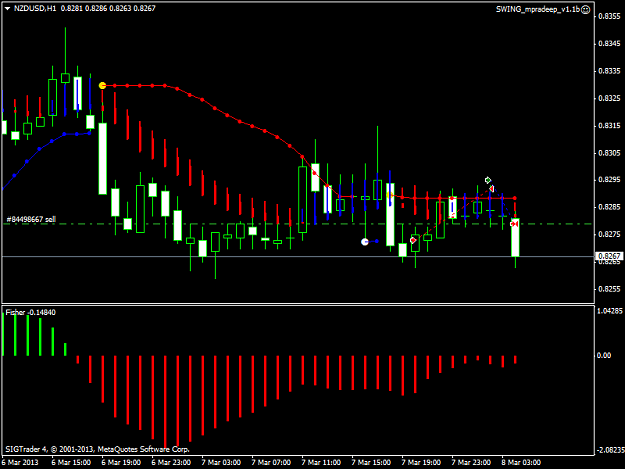
Did you check if indicators works fine? Fisher is repainting, so it's possible that currend red bar becomes blue later...
Did you check if indicators works fine? Fisher is repainting, so it's possible that currend red bar becomes blue later...
Ignored
So waht is the solution? Is the EA sense the fisher what I put in chart? Or should I use fisher fisher no repainting indicator?If I use fisher no repainting than do you think it will solve the problem?please chk the indicator. Period should be 30.
So waht is the solution? Is the EA sense the fisher what I put in chart? Or should I use fisher fisher no repainting indicator?If I use fisher no repainting than do you think it will solve the problem?please chk the indicator. Period should be 30.
Ignored
I modified EA to use Fisher_no_repainting, indicator must be in expert/indicators folder, with exactly the same name.
I'm not sure if this will help, please test.
I modified EA to use Fisher_no_repainting, indicator must be in expert/indicators folder, with exactly the same name.
I'm not sure if this will help, please test.
I have started using this EA on live account. I have noticed that EA is opening more than one buy and sell position when more positions hit TP at same time. for examples if 3 buy positions hit the TP at same time then EA is opening 3 buy and sells position at the same time. Can this be resolved in such a way that EA opens only 1 buy and sell position even after hitting TP for more than one open position.
Okay been playing with the Incognito Mod EA and seems to be working good so far. I will continue to test and see what I come up with. There are a handful of changes that I would like to do to make it easier like instead of inputting the price in the script I can change it to pips, etc. Like stated I will continue to test this and wait for the close_positions EA first, so we can close this chapter before moving on. Thanks Kis.
Ignored
Here is the version with the additional time closing option. Please test and let me know if you find any bugs.
Here is the version with the additional time closing option. Please test and let me know if you find any bugs.
Ignored
Everything looks good.
Quick question...
Under "--Close-at/after-specific-time-GMT-"
You have the following
gmt_offset_hours
gmt_offset_minutes
I understand that the above is so I can set it to a sspecfic GMT time such as (17:21) and this will allow to close the positions at or after the specified time as long as the parameters are valid.
close_hour
close_minute
Not sure what this is, can you explain? Thanks.
Charles
Faith ends where worry begins, and worry ends where faith begins.
I understand that the above is so I can set it to a sspecfic GMT time such as (17:21) and this will allow to close the positions at or after the specified time as long as the parameters are valid.
Ignored
Here you have to set the GMT offset compared to your MT4 server time. This could be done auto, but as I understand that would need dll import/outside MT4 info. As MT4 knows only your local PC time and server time. It can be done, but I say it doesn't worth.
Quote
Disliked
close_hour
close_minute
Not sure what this is, can you explain? Thanks.
Charles
Here you can set the time, when you want to close the positions. It is at/after-specific-time, because if for some reason (disconnection, re quote, etc.) EA can't close your positions at the specific time ( within the minute you set) positions will be left open. So I set it to close at the time you set, or after if there is a problem...
Okay to my understanding the GMT setting works great. The difference between the broker time and GMT time is +2 hours for one of the brokers I use, but I thought when I put it in GMT time not broker time in the GMT setting it seems to work. Maybe I am wrong. Either way I can use this. The other setting is a precaution in case the first setting fails, which is brillant. Thanks for thinking of that, appreciate it. Can I get the mq4 file for this as I think this will do. You have been great, thank you again... I will now move on to the incognito file.
Faith ends where worry begins, and worry ends where faith begins.
So waht is the solution? Is the EA sense the fisher what I put in chart? Or should I use fisher fisher no repainting indicator?If I use fisher no repainting than do you think it will solve the problem?please chk the indicator. Period should be 30.
Ignored
Brother seems no repainting Ea is working fine but after testing fully on Monday I will tell you. But what I find with no repainting indicator is it is giving signal after henki and bolinger. Can you modify the fisher no repainting indicator such a way that fisher should givebuy or sell signal one candle before henki and bolinger?
Brother seems no repainting Ea is working fine but after testing fully on Monday I will tell you. But what I find with no repainting indicator is it is giving signal after henki and bolinger. Can you modify the fisher no repainting indicator such a way that fisher should givebuy or sell signal one candle before henki and bolinger?
Ignored
Or can you remove fisher from EA . Long only when henki and bolinger blue sht only when both are red.
I am looking for an EA to trade based on the last 4 Hour Candle. Minimum bar size for the last 4 hour candle should be not less than 40 pips ( Inclusive of candle wick).
The EA should open two pending orders one long and one short which should be like this :
Open long pending order 2 pips above last four hour candle close, with stop loss 50 and take profit 80 with provision to modify the stop loss and take profit and similarly
one short pending order 2 pips below the last four hour candle close, with stop loss 50 and take profit 80 with provision to modify the stop loss and take profit, with provision to modify the lot size.
There should be a provision to modify the candle TF so that I can try this EA on the one hour and 30m time frame candles also or else if the EA is placed on an hourly chart, the EA should work on the same principles but should consider the last one hour candle and similarly for other smaller time frame charts.
Once the EA is started, it should check first for the close of the current four hour candle before placing any pending orders.
I have gone through many sited to locate if any EA already exists and I am not aware of one. If there is a similar on any forex forums, the link may please be provided.
Okay to my understanding the GMT setting works great. The difference between the broker time and GMT time is +2 hours for one of the brokers I use, but I thought when I put it in GMT time not broker time in the GMT setting it seems to work. Maybe I am wrong. Either way I can use this.
Ignored
No, you need to set the GMT offset. EA doesn't know what is GTM time, only if you set it.
Quote
Disliked
The other setting is a precaution in case the first setting fails, which is brillant. Thanks for thinking of that, appreciate it.
No, first you have to set the offset then the time you want to close the position.
Quote
Disliked
Can I get the mq4 file for this as I think this will do. You have been great, thank you again... I will now move on to the incognito file.



 I will code your EAs and Indicators for no charge