You can access the Indicator from this link:
https://tradingfinder.com/products/i...monic-pattern/
You can access the Indicator on the TradingView website:
https://www.tradingview.com/script/u...Reversal-Auto/
Prop Firm DrawDown Protector : Prop Firm Capital Protection Expert MT5 |Forex Money Management: Forex Trade Management Expert MT5 | ICT Concepts Indicator MT5 |Smart Money Concepts Expert MT5 | Smart Money Trap Scanner |Get a free Expert Advisor license via Telegram and WhatsApp
Understanding the Nen Star Harmonic Pattern Structure
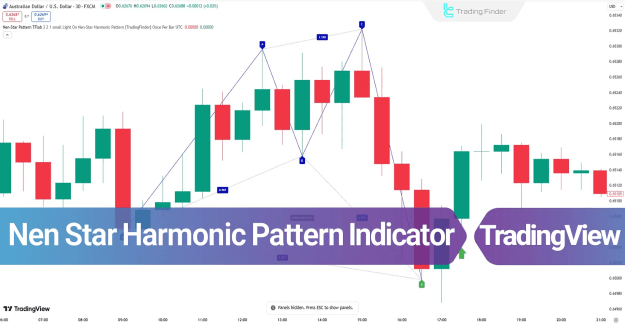
The Nen Star harmonic pattern is built on five key points: X, A, B, C, and D. These points map the price action, from the initial movement to the final reversal zone.
- Point X: The starting point of the price movement.
- Point A: The end of the initial price move.
- Point B: The first retracement, located between the 0.382 and 0.786 Fibonacci levels of the XA leg.
- Point C: The second retracement, positioned within the 1.13 to 1.414 Fibonacci range of the AB movement.
- Point D: The most crucial point, representing the Potential Reversal Zone (PRZ).
Application in Different Market Trends
The Nen Star Indicator provides clear signals for both uptrends and downtrends, helping traders to anticipate market shifts.
Bullish Nen Star Pattern (Uptrend)
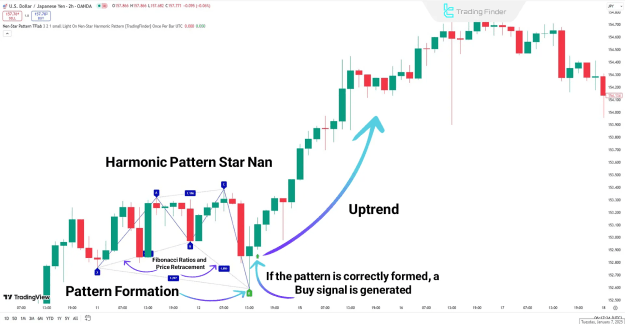
The indicator identifies a bullish Nen Star pattern, which typically forms an "M" shape on the chart. This pattern signals the end of a bearish move as the price reaches Point D in the PRZ. A buy signal, marked by a green arrow, is generated after Point D, indicating a potential trend reversal to the upside.
Bearish Nen Star Pattern (Downtrend)
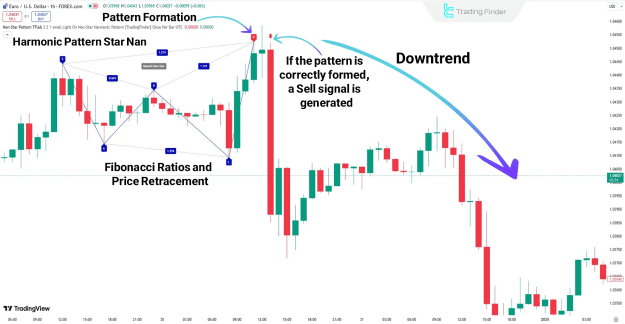
Conversely, after Point D in a bearish Nen Star pattern, a confirmation bearish candle appears, signaling the start of a downtrend. The indicator identifies the sell signal near Point D. Traders can place their Stop Loss (SL) slightly above Point D for risk management and set Take Profit (TP) targets based on the continued downtrend.
Key Indicator Settings
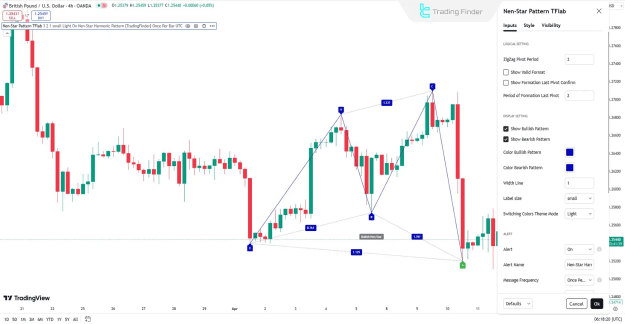
The settings for the Nen Star Harmonic Pattern Indicator are categorized into three main sections: Logical, Display, and Alert.
- Logical Settings:
- ZigZag Pivot Period: Defines the calculation period for pivot points.
- Show Valid Format: Enables the display of valid patterns.
- Show Formation Last Pivot Confirm: Displays confirmation of the last pivot.
- Period of Formation Last Pivot: Sets the calculation period for the last pivot confirmation.
- Display Settings:
- Show Bullish/Bearish Pattern: Enables or disables the display of specific patterns.
- Color Bullish/Bearish Pattern: Allows for custom color settings.
- Width Line: Adjusts the thickness of the pattern lines.
- Label Size: Controls the size of text labels on the chart.
- Switching Colors Theme Mode: Changes the background theme.
- Alert Settings:
- Alert: Generates a notification when a pattern is detected.
- Alert Name: Allows for customizing the alert name.
- Message Frequency: Defines the frequency of messages upon pattern formation.
- Show Alert Time by Time Zone: Displays the alert time based on the selected time zone.
Conclusion
The Nen Star Harmonic Pattern Indicator is an effective tool for identifying high risk-to-reward trading opportunities across various markets, including Forex, cryptocurrencies, and stocks. Its ability to precisely identify Potential Reversal Zones (PRZ) and target price levels makes it a valuable asset for optimizing profitability and managing risk in a trading strategy. The indicator provides clear visual buy signals (green arrow) and sell signals (red arrow), making it user-friendly for traders of all skill levels.