Disliked{quote} For alert, I think you have to wait for tick coming in. By the way, I think I missed something in my previous upload. Please use this updated one. {file}Ignored
Attached File(s)
I will code your pivot EAs for no charge 28 replies
I will code your scalping EAs for no charge 163 replies
Oanda MT4 - Indicators and EAs not showing 2 replies
EAs and indicators relating to moutaki... 22 replies
InterbankFX has loaded its MT4 platform with custom EAs, indicators and scripts 1 reply
Disliked{quote} For alert, I think you have to wait for tick coming in. By the way, I think I missed something in my previous upload. Please use this updated one. {file}Ignored
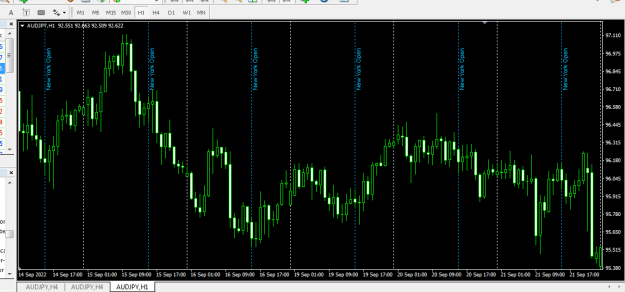
Disliked{quote} Hello BlueRain please can you help to set this vertical line based on 4hrs time frame it showed on 1hr time frame i have been fiddling with the setting but could not get the hang of it on how to display on 4hrs please kindly see what im doing wrong because input setting has 4hrs .Thanks{image}{file}Ignored
DislikedCan you help convert this rectangle extender to mt5 (see code below), or if you already have it please give me the mql5 file. Thanks.Ignored
DislikedDear gifted coders, could it be possible to do this in MT4 cause and effect the triangle A is caused by the signal from the lowest window, which gives us the observation triangle in RSI, which monitor the triangle in the price window. When a new signal in the lowest window appears, the painting of triangle A is completed. Depends on the arrow the observation triangle in RSI window is newly draw. As the cause in the time line does not changed when it was happened, all MTF observations of the triangle give us unique nformation on price base on the...Ignored
Disliked{quote} DEAR TT, thanks for the mini chart,it works properly,but synch indicator is not working, i dont want the lines to be delete,i want it to appear or not appear when i click on and off on D chart.i dont want the lines to be deleted.Ignored
Disliked{quote} I remade it a bit. To delete the rectangle and the line you need to double click on one of the corners of the rectangle and wait for ticks to come in. Otherwise, when I use the method on delete, the line is not deleted. {file}Ignored
Disliked{quote}{quote} what bad mannersdid they give you open source?
if you didn't rewrite these indicators from 0: so be kind to return open source! {quote} is this your indicator?
why are you trying to steal it??
dirty thief... P.S. the real author of ArrZZ or "SuprRes" is russian coder Bookkeeper.. R.I.P
{quote}
i see, that you want to steal it, but not to modify
{image} {file}
Ignored
int deinit2()
{
long currChart = ChartFirst();
while(true)
{
if(ChartSymbol(currChart) == _Symbol && (setting1 == 1 ))
{
ObjectsDeleteAll(currChart, "Vertical Line");
ObjectsDeleteAll(currChart,"Horizontal Line");
ObjectsDeleteAll(currChart, "Trendline");
ObjectsDeleteAll(currChart,"Trend By Angle");
ObjectsDeleteAll(currChart, "Cycle Lines");
ObjectsDeleteAll(currChart,"Horizontal Line");
ObjectsDeleteAll(currChart, "Channel");
ObjectsDeleteAll(currChart,"Equidistant Channel");
ObjectsDeleteAll(currChart, "StdDev Channel");
ObjectsDeleteAll(currChart,"Regression Channel");
ObjectsDeleteAll(currChart, "Andrews Pitchfork");
ObjectsDeleteAll(currChart,"Gann");
ObjectsDeleteAll(currChart, "Fibo");
ObjectsDeleteAll(currChart,"Expansion");
ObjectsDeleteAll(currChart, "Rectangle");
ObjectsDeleteAll(currChart,"Triangle");
ObjectsDeleteAll(currChart, "Ellipse");
ObjectsDeleteAll(currChart,"Arrow");
ObjectsDeleteAll(currChart, "Text");
ObjectsDeleteAll(currChart,"Label");
ObjectsDeleteAll(ChartNext(currChart), "Vertical Line");
ObjectsDeleteAll(ChartNext(currChart),"Horizontal Line");
ObjectsDeleteAll(ChartNext(currChart), "Trendline");
ObjectsDeleteAll(ChartNext(currChart),"Trend By Angle");
ObjectsDeleteAll(ChartNext(currChart), "Cycle Lines");
ObjectsDeleteAll(ChartNext(currChart),"Horizontal Line");
ObjectsDeleteAll(ChartNext(currChart), "Channel");
ObjectsDeleteAll(ChartNext(currChart),"Equidistant Channel");
ObjectsDeleteAll(ChartNext(currChart), "StdDev Channel");
ObjectsDeleteAll(ChartNext(currChart),"Regression Channel");
ObjectsDeleteAll(ChartNext(currChart), "Andrews Pitchfork");
ObjectsDeleteAll(ChartNext(currChart),"Gann");
ObjectsDeleteAll(ChartNext(currChart), "Fibo");
ObjectsDeleteAll(ChartNext(currChart),"Expansion");
ObjectsDeleteAll(ChartNext(currChart), "Rectangle");
ObjectsDeleteAll(ChartNext(currChart),"Triangle");
ObjectsDeleteAll(ChartNext(currChart), "Ellipse");
ObjectsDeleteAll(ChartNext(currChart),"Arrow");
ObjectsDeleteAll(ChartNext(currChart), "Text");
ObjectsDeleteAll(ChartNext(currChart),"Label");
ChartRedraw(currChart);
}
if(ChartSymbol(currChart) == _Symbol && ChartNext(currChart) == ChartID() && (setting1 == 2 && _Period>=ChartPeriod(currChart))) //Deleate 1 default chart
{
ObjectsDeleteAll(ChartNext(currChart), "Vertical Line");
ObjectsDeleteAll(ChartNext(currChart),"Horizontal Line");
ObjectsDeleteAll(ChartNext(currChart), "Trendline");
ObjectsDeleteAll(ChartNext(currChart),"Trend By Angle");
ObjectsDeleteAll(ChartNext(currChart), "Cycle Lines");
ObjectsDeleteAll(ChartNext(currChart),"Horizontal Line");
ObjectsDeleteAll(ChartNext(currChart), "Channel");
ObjectsDeleteAll(ChartNext(currChart),"Equidistant Channel");
ObjectsDeleteAll(ChartNext(currChart), "StdDev Channel");
ObjectsDeleteAll(ChartNext(currChart),"Regression Channel");
ObjectsDeleteAll(ChartNext(currChart), "Andrews Pitchfork");
ObjectsDeleteAll(ChartNext(currChart),"Gann");
ObjectsDeleteAll(ChartNext(currChart), "Fibo");
ObjectsDeleteAll(ChartNext(currChart),"Expansion");
ObjectsDeleteAll(ChartNext(currChart), "Rectangle");
ObjectsDeleteAll(ChartNext(currChart),"Triangle");
ObjectsDeleteAll(ChartNext(currChart), "Ellipse");
ObjectsDeleteAll(ChartNext(currChart),"Arrow");
ObjectsDeleteAll(ChartNext(currChart), "Text");
ObjectsDeleteAll(ChartNext(currChart),"Label");
ChartRedraw(currChart);
}
if(ChartSymbol(currChart) == _Symbol && ChartNext(currChart) != ChartID() && (setting1 == 3 && _Period<=ChartPeriod(currChart))) //keep 1 default chart
{
ObjectsDeleteAll(ChartNext(currChart), "Vertical Line");
ObjectsDeleteAll(ChartNext(currChart),"Horizontal Line");
ObjectsDeleteAll(ChartNext(currChart), "Trendline");
ObjectsDeleteAll(ChartNext(currChart),"Trend By Angle");
ObjectsDeleteAll(ChartNext(currChart), "Cycle Lines");
ObjectsDeleteAll(ChartNext(currChart),"Horizontal Line");
ObjectsDeleteAll(ChartNext(currChart), "Channel");
ObjectsDeleteAll(ChartNext(currChart),"Equidistant Channel");
ObjectsDeleteAll(ChartNext(currChart), "StdDev Channel");
ObjectsDeleteAll(ChartNext(currChart),"Regression Channel");
ObjectsDeleteAll(ChartNext(currChart), "Andrews Pitchfork");
ObjectsDeleteAll(ChartNext(currChart),"Gann");
ObjectsDeleteAll(ChartNext(currChart), "Fibo");
ObjectsDeleteAll(ChartNext(currChart),"Expansion");
ObjectsDeleteAll(ChartNext(currChart), "Rectangle");
ObjectsDeleteAll(ChartNext(currChart),"Triangle");
ObjectsDeleteAll(ChartNext(currChart), "Ellipse");
ObjectsDeleteAll(ChartNext(currChart),"Arrow");
ObjectsDeleteAll(ChartNext(currChart), "Text");
ObjectsDeleteAll(ChartNext(currChart),"Label");
ChartRedraw(currChart);
}
if(ChartNext(currChart) < 0) break;
else currChart = ChartNext(currChart);}
return(0);
}
//+------------------------------------------------------------------+
void OnDeinit(const int reason)
{
long currChart = ChartFirst();
if( reason == REASON_REMOVE )
while(true){
{
if(ChartSymbol(currChart) == _Symbol) deinit2(); ObjectsDeleteAll(currChart,IndicatorObjPrefix);ObjectsDeleteAll(ChartNext(currChart), IndicatorObjPrefix);
ChartIndicatorDelete(ChartNext(currChart),0,WindowExpertName());
}
if(ChartNext(currChart) < 0) break;
else currChart = ChartNext(currChart);}
}
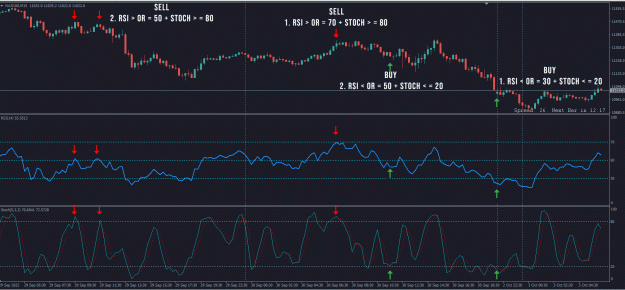
//+------------------------------------------------------------------+ Disliked{quote} Hi tonyjustcom . I think I know why this happen . your setting custom stochastic different me . try this version you can fine setting but this version I add 2 ma for trend signal . if you don't like ma you can setting "ShowMA = false" . sorry for my English. {image} {file}Ignored
Disliked{quote} Thank you very much for the help, I really appreciate it. Even though the indicator seems to be very buggy, but at least we have made progress, and its all thanks to you.Ignored
Disliked{quote} I just tried the original that you posted, in MT4 and it also odesn't work properly. The line is not deleted when the rectangle is deleted. For the MT5 version, I suggest you always start plotting the rectangle starting from the right to the left. This will make the experience better.Ignored
Disliked{quote} Oh ok, well in that case, can you help remove the middle line altogether as I don't really need it and that may even help make it work better. And if its not a bother can you make the box indicate its width in pips on the right side of the box. Good tip about drawing it from right to left, it works better that way, thanks again. But the bugs I was referring to in my original post is that I also noticed that when I finish drawing the box and then unselect it (double click), the box then vanishes. Does it do that to you?Ignored
DislikedHi Tankk I like how you write code to help people and your straightforwardness. if you are a woman I'm going to ask you to marry me.
Ignored
DislikedI'm not a code expert. I like to copy and paste. I'm embarrassed to show you my code. ....Ignored
Disliked{quote} Yes, I wrote about that. Double clicking deletes the box. I was thinking that this fact might be a problem. Yes, I can work on it a bit more.Ignored
Disliked{quote} You are 100% right, u did mention about the deleting box. I cant believe i missed that lol. Anyways I really appreciate your assistance with this, thanks alot.Ignored
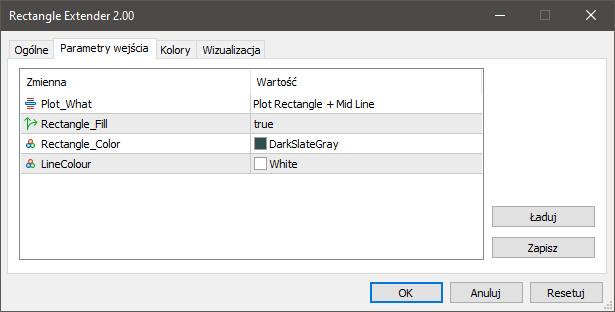
Disliked{quote} OK, I made a few changes, so this is a better version: {image}So, now you can select if you want only the Rectangle or Rectangle + Mid Line. You can select if you want the rectangle filled, or empty. You can select the rectangle color. You can select the line color. If you select only Rectangle, the line will not be plotted, and you can double click select the rectangle, and work with it. Then, if you want to delete it, you must do it manually. If you select Rectangle + Mid Line, the line will be plotted, and you can still double click select...Ignored