thank you for your deails instruction.
No I havent used profiling before in metaeditor. On my chart is +TPO only, and RSI, but even without RSI it is already slow, so something in that code eats all resource
Dear Coders
I hope you all doing fine, i have a request for you all. I have attached an indicator it is a 3 MA Cross Indicator, but sound alert , shift selection and auto refresh functionality is not working. Its my humble request to you all, please provide this functionalities. I sincerely thank you all.
Dear Coders I hope you all doing fine, i have a request for you all. I have attached an indicator it is a 3 MA Cross Indicator, but sound alert , shift selection and auto refresh functionality is not working. Its my humble request to you all, please provide this functionalities. I sincerely thank you all. {file}
Dear Coders I hope you all doing fine, i have a request for you all. I have attached an indicator it is a 3 MA Cross Indicator, but sound alert , shift selection and auto refresh functionality is not working. Its my humble request to you all, please provide this functionalities. I sincerely thank you all. {file}
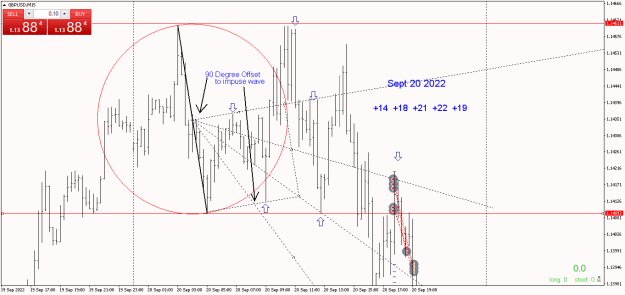
{quote} jeanlouie....love the circle tool you gave us...works perfectly....I add the offset squares to my analyses and drawing it would be so much more efficient if I had a tool that could draw the offset square as shown. Do you have anything in your tool box that might work....could the grid tool be reconfigured to allow offsetting? Thanks in advance... {image} {image}
Ignored
is this and indicator or a tool? and can u share plz it looks fun
{quote}...I add the offset squares to my analyses and drawing it would be so much more efficient if I had a tool that could draw the offset square as shown...
Ignored
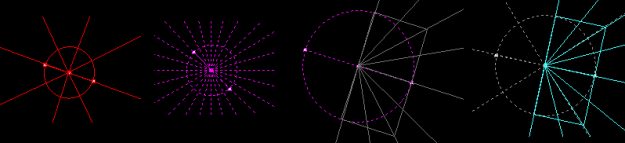
Circle_wRays
- circle with either circle rays or square rays, both rays optional
- option for circle rays right around every x'degrees
- 2 quadrant squares with rays
- separate styling
edit
- squares moved to same semicircle
edit
- general bug fixes made in haste
{quote} Circle_wRays - circle with either circle rays or square rays, both rays optional - option for circle rays right around every x'degrees - 2 quadrant squares with rays - separate styling {image} {file}
Ignored
How in the world did I miss that??.....I use all your tools daily but missed that little gem when you posted the updates....many thanks once again.!!
...uses less resource? I have i7 8th gen 24GB RAM but can not open 2 charts with this indicator and data range set to 5 (display for last 5 days) even with one chart...
Ignored
It's a profile indicator, the biggest drawback is the object count, so don't worry about a thin level histogram.
On default settings on my eurusd chart is about 20k objects, changing just the price step from 0 to 10(point height of histogram), cuts the object count by almost a factor of 10. On s&p500 I got a 100k object count, can barely scroll, increasing price step from 0 to 100 cuts it down to about 2k, chart scrolls fine. Range count is another input you can reduce to cut object count down.
{quote}...One suggestion is to run the indicator less often than every tick...you could use this ...runNoMoreThanOncePerSecond...
Ignored
It already has a once per xsecond limiter at the start of start(), WaitSeconds used isn't a user input but I doubt increasing it to 1000seconds would have any noticeable change if there is a high object count.
{quote}... 'ArrayCopyRates' is taking up the most time...'Start Profiling'...
Ignored
It's a volume profile indicator with optional tf selection for source price data, it makes sense that functions to support collecting and checking rates data would take some time. If the indicator did nothing else at all but collect and prepare rates data it'd still take some cpu time initially. If it didn't collect rates at all and just made a bunch of random objects it'd be the same as it is now, object count is a big slow down.
Hi Comar.Fx! I really loved using your indicator.We are so blessed that you made some awesome indis. How ever is it possible for me to get the mq4 file? or if you can help me modify it. I want the arrow to paint only at the first hour of the daily candle. After the first hour, I dont want it to paint an arrow anymore. Thank you so much! I have attached the wonderful indicator that you made. Im hoping for your reply I'm very much willing to pay for this if its needed. Thank you! {file}
Ignored
Friends, I need this file in MQ4, can anyone help me?
{quote} Circle_wRays - circle with either circle rays or square rays, both rays optional - option for circle rays right around every x'degrees - 2 quadrant squares with rays - separate styling {image} {file}
Ignored
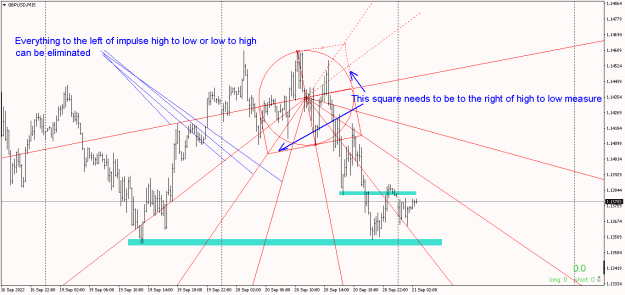
Now, I can use the indicator as posted just fine....but if you want it to be perfection then a couple changes as shown....we are only interested what can happen after an impulse wave, up or down, everything in the past is only clutter....so the two squares should be to the right of the measurement from low to high or vice versa. That way you have tradeable levels whether price goes long or short....if you compare with my trading chart of today, there was a better entry earlier....
{quote} It's a profile indicator, the biggest drawback is the object count, so don't worry about a thin level histogram. On default settings on my eurusd chart is about 20k objects, changing just the price step from 0 to 10(point height of histogram), cuts the object count by almost a factor of 10. On s&p500 I got a 100k object count, can barely scroll, increasing price step from 0 to 100 cuts it down to about 2k, chart scrolls fine. Range count is another input you can reduce to cut object count down. {quote} It already has a once per xsecond limiter...
Ignored
thank you for your advises of you both jeanlouie & pips4life. Appreciated very much.
When it is slow you modify the parameters to decrease object count, but where do you see it at first place, in meta editor ?
if "object count is a big slow down." would it matters it it count different object types? like if counting rectangle objects is slow, counting thin lines would solve the problem and give the same end result? or if counting lines compare to counting dots...would it help?
in order to use this tpo on indices we need to tramatiscally modify the paameters, like with factor 100, how can we program that the tpo auto recognize applicated on FX, commodity or indices? And why when apply on GE40 it displays not more than 2 days? there is no error msg on expert or logging, how to find why it behaves so?
{quote} thank you for your advises of you both jeanlouie & pips4life. Appreciated very much. When it is slow you modify the parameters to decrease object count, but where do you see it at first, in meta editor ? if "object count is a big slow down." would it matters it it count different object types? like if counting rectangle objects is slow, counting thin lines would solve the problem and give the same end result? or if counting lines compare to counting dots...would...
Ignored
You noticed just reducing object count through user settings shows a big difference?
Quote
Disliked
When it is slow you modify the parameters to decrease object count, but where do you see it at first, in meta editor ?
As in see the issue?
- On the chart. Knowing what the indicator is, and then looking at it loaded with defaults, I already know the issue. Volume profiles can end up using a lot of objects to make the histograms. A fine-edge histogram will potentially have a huge amount of objects that add no discernable value, ie you'd barely tell the difference between level heights of 1point to 10points, but one has 1/10th the objects. Source tf data will have a bigger impact on histogram shape and price of loc and any %levels. I've made them before and have encountered these issues and tradeoffs.
- I still opened it in metaeditor to have a skim, it's done with diligence and unlikely to be improved outside of user settings.
As in see the options to address it?
- I already know what the indicator is and what will lead to a too high object count, price step looks like it'd be the level height so I changed that. Reducing whatever input is for history would help too, but changing level height is more helpful.
Quote
Disliked
if "object count is a big slow down." would it matters it it count different object types?
Technically, maybe, practically, probably not. I suspect it's the terminal having to handle displaying all the objects, ie checking what to draw/notdraw/then actually draw. You could have a do nothing indicator that makes a bunch of objects once and it'll slow the chart.
{quote} You didn't give a full example, but here are several things I notice: The Time1 field is 0, so the object is getting created at time=1970.01.01, far to the left of all the bars on the chart The Price1 field is the value of RSI, which is a range 0<ar<100. As a *price* on a chart, the RSI value makes no sense The choice of "OBJ_ARROW_RIGHT_PRICE" does not seem suited for what I think you're trying to do, which is to display RSI value somewhere. Better to use "OBJ_TEXT" or "OBJ_LABEL" Even if the ObjectCreate of an OBJ_TEXT (or Arrow) were...
{quote} Like I said, it is not possible to save to another folder due to MT4 restriction. MT4 only allow file to save to under its \Files. Your files are saved under MQL4\Files folder. What you can do is to create some short-cut to your desktop and open that folder automatically when you click that short-cut. Full Path to file would be: C:\Users\<your user name>\AppData\Roaming\MetaQuotes\Terminal\<MT4 GUID folder>\MQL4\Files You can open that folder by "File" -> "Open Data Folder" Documentation says: Note The screen shot is saved in the terminal_dir\experts\files...
Ignored
Hello, sir if we use mt4 portable so is it work for output folder also ??


 I will code your EAs and Indicators for no charge