

 Meet the IQ Trading Bot: Your IQ Option Tab Just Got an AI Co-Pilot
Most IQ Option traders run three things at once — the broker's chart, a second tab for analysis, and a Telegram channel they're half-watching for signals. The IQ Trading Bot collapses all three into one panel that lives right inside your IQ Option tab. It reads the chart, scores setups against built-in AI strategies, and streams the results to you in real time — and if you want, it can take the trade for you too.
It's not a magic profit button, and it doesn't pretend to be one. It's better described as a signal-and-execution layer that sits on top of the broker you're already using — so let's get into exactly what it does, how it's built, and what's worth checking before you let it trade live.

 What It Does, In Plain Terms
Strip away the marketing and the extension boils down to three jobs:
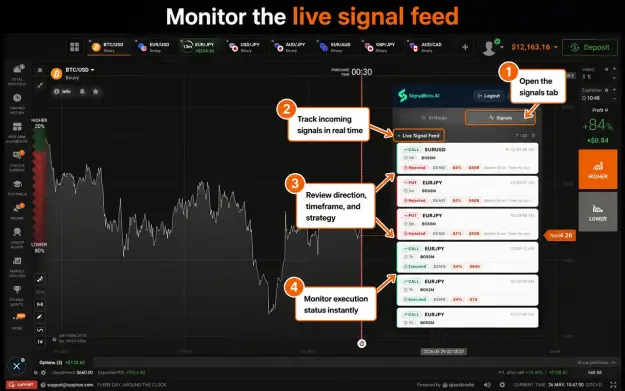
 It scans the live IQ Option chart and grades setups using one of its built-in strategies
 It pushes those setups into a side panel as they happen — taken, skipped, or filtered out, with a reason for each
 It either waits for your click or, with Auto-Trade on, places the order itself according to limits you define
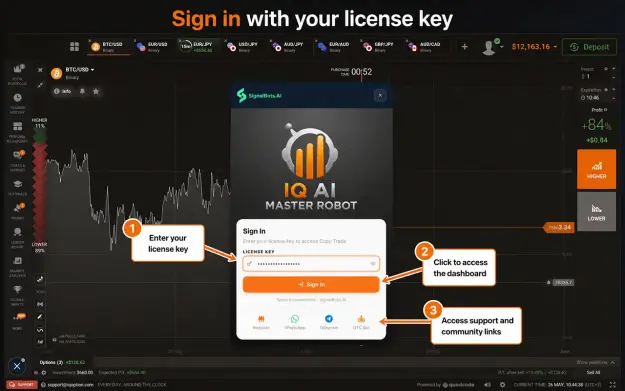
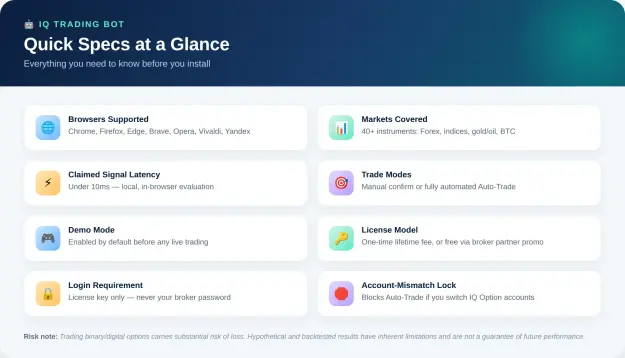
Everything runs inside your browser. The developer's claim is that no chart data or trading history ever leaves your machine, and the extension never touches your IQ Option password  — it activates with its own SignalBots license key instead, leaving your actual broker login untouched.
 Compatibility Rundown
- Browser support: One build covers Chrome and Chromium forks (Edge, Brave, Opera, Vivaldi); a second MV3 build covers Firefox and its forks (LibreWolf, Waterfox, Zen). Desktop-only, across Windows, macOS, and Linux.
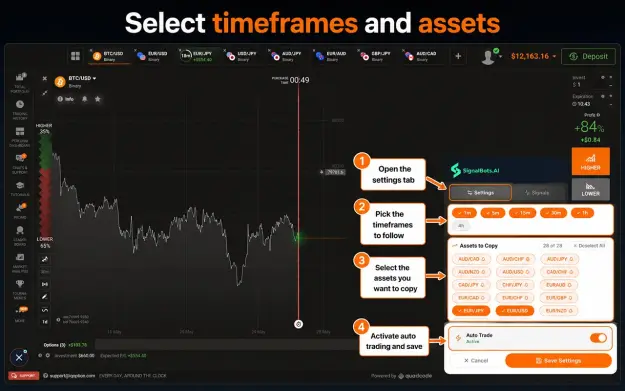
- Market coverage: 40+ tradable instruments spanning Forex majors/crosses, gold, silver, WTI/Brent crude, several global indices, and Bitcoin.
- Broker domains: Detects automatically across iqoption.com, iqbroker.com, iq-option.com, and a few IQ Option mirrors.
 The Three Strategies Under the Hood
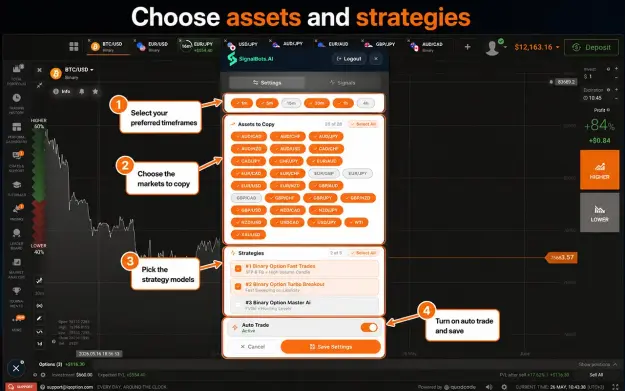
Three strategies ship out of the box, each tuned for a different rhythm of the trading day. The percentages below come straight from the developer's own backtests — they describe historical/simulated performance, not a promise of what happens on your account, so it's worth confirming them yourself on demo first. 
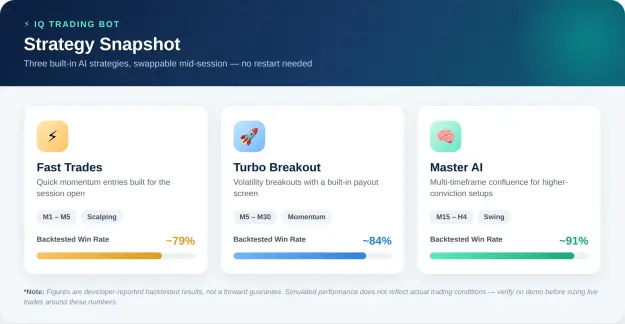
 Fast Trades — fast M1–M5 momentum entries, built for the volatility right at the session open.
 Turbo Breakout — targets volatility expansions across M5–M30, with a payout filter built in.
 Master AI — a multi-timeframe confluence model running M15–H4, aimed at fewer but higher-conviction setups.
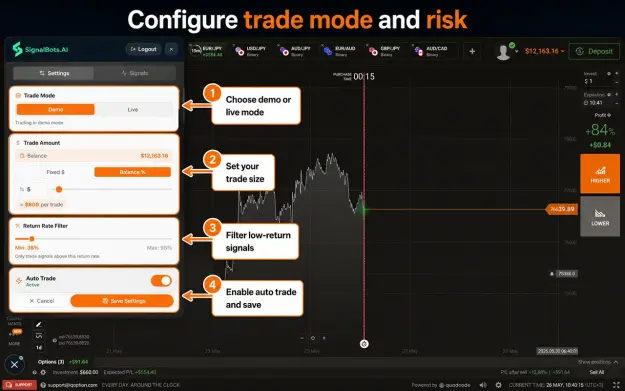
Switching strategies mid-session doesn't restart the panel, and a Return Rate filter (80% by default) automatically skips any signal where IQ Option's own payout dips below your chosen floor.
 The Safeguards That Actually Matter
A handful of details here are clearly there to stop the bot from running wild:
 Demo Mode on by default — every fresh install starts against IQ Option's simulated balance, not real funds.
 Account-Mismatch protection — the license ties to one specific IQ Option account, so trading a different account in the same browser triggers a block instead of a wrong-account fill.
 Two execution modes — leave Auto-Trade off and every signal waits for your click; turn it on and the bot executes within the limits you've set.
 Fixed or percentage sizing — choose dollars-per-trade or a percent of balance once, and it's applied the same way to every Auto-Trade order afterward.
 Specs at a Glance
 Setting It Up
 Log into (or open) your IQ Option account as usual.
 Install the extension from the Chrome Web Store or Firefox Add-ons.
 Activate your license — a one-time lifetime purchase, or the broker-partner promotion that SignalBots support can set up for you.
- Spend real time on Demo first — dial in your timeframe, strategy, and return-rate filter before ever switching to Live.
Where This Leaves You
If you're already trading IQ Option and want signal generation — and optionally execution — built into the same tab rather than bolted on through a second screen, the IQ Trading Bot does that job well. The local-only design and the demo-first/account-mismatch guardrails are the kind of detail that suggests some thought went into not letting the tool outrun the trader. Just don't mistake a backtested win rate for a forward guarantee — put in enough demo time to form your own opinion before trusting it with real size. 
 Risk disclosure: Trading binary and digital options involves a high level of risk and may not be suitable for everyone. Backtested and hypothetical performance figures have known limitations and don't represent real trading outcomes — past or simulated results don't guarantee future ones. This piece is for information only, not financial advice; do your own research before connecting any automated tool to a live trading account.