



Quotex Trading Bot 2026 — How the AI Hunter Robot Works Inside Your Browser [Complete Guide]
Every fixed-time trade on Quotex has an expiry clock attached to it. Miss the entry window by a second and the setup is gone — the payout has shifted, the candle has moved, and placing the order now means entering on different terms than the ones that made the setup valid. Speed is not a secondary concern on this platform. It is the primary constraint.
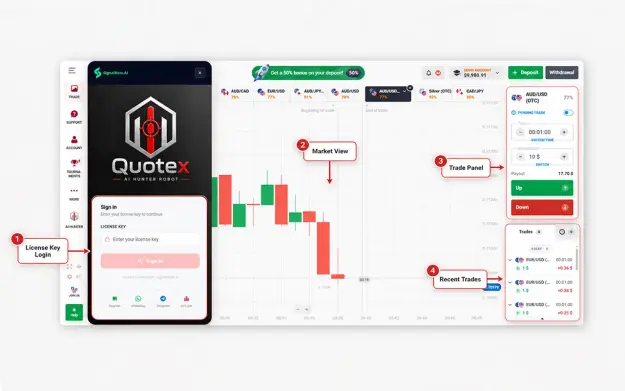
The Quotex Trading Bot by SignalBots is built around that constraint. It is a browser extension — compatible with Chrome, Firefox, Edge, Brave, Opera, and all major desktop browsers — that attaches a live AI panel directly to your open Quotex tab. From there it monitors price tick by tick, filters signals through three algorithmic strategies and a configurable payout floor, and executes CALL or PUT orders in under 10 milliseconds. You choose whether trades fire automatically or appear for your manual confirmation first.
There is no external platform to log into. No broker password required. No separate trading terminal. The panel opens when your Quotex tab opens and goes quiet when you close it.
How It Works
Installation connects the extension to your Quotex session automatically. No setup wizard, no configuration step — the panel slides in from the right side of your tab and begins streaming signals immediately. The engine underneath runs a continuous evaluation loop: 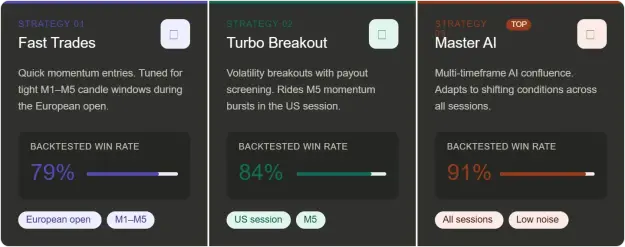
Each strategy is independently backtested and optimized for different session conditions. Switch between them mid-session with one click — the panel does not restart and the signal log carries over.
Eight Features Built Into the Panel
1. Under-10ms local execution
The reaction time numbers tell the story directly: manual click averages 300ms, cloud-based bots average 80ms, the Quotex Trading Bot reacts in under 10ms. That gap exists entirely because evaluation runs locally. On a fast-moving M1 chart, 290ms is the difference between entering on the open and chasing a candle that has already run.
2. Minimum payout floor
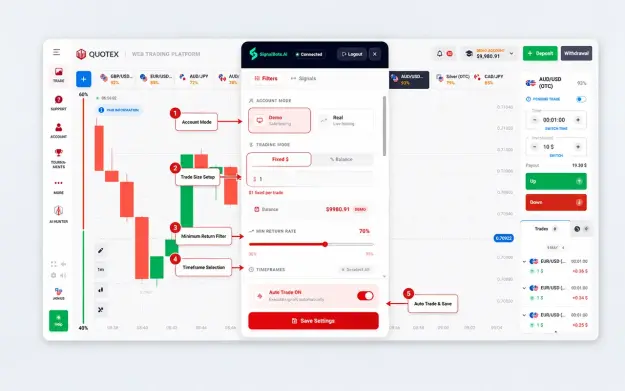
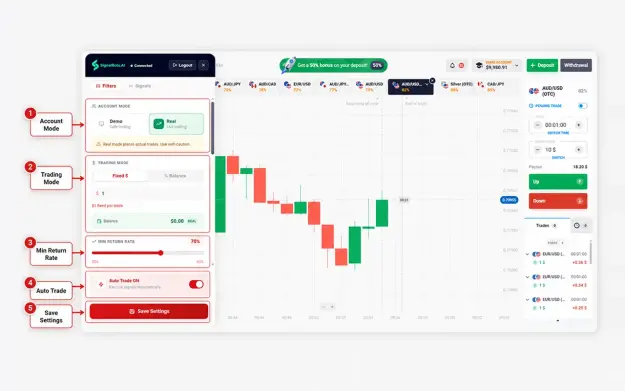
Before any signal reaches the panel, it is checked against a minimum return rate you set. The default is 80%. Signals below that floor are rejected and written to the log with the reason. During Asian session hours when Quotex payouts on many pairs tend to compress, this filter works silently in the background — skipping setups that would not clear the math rather than presenting them for you to reject manually.
3. Full signal log with skip reasons
Every signal the bot evaluates shows up in the log — executed, filtered, or skipped — tagged with the exact reason. Low payout. Account mismatch. Strategy inactive for that asset. Timeframe excluded. The log is a session-level audit trail that tells you not just what the bot traded, but what it chose not to trade and why.
4. Demo and live — one toggle, identical behavior
Flip between demo and live mode from the popup. Strategies, filters, signal log, and auto-trade settings are identical in both modes. What you observe and validate on the demo balance is exactly what will run on your live account — no behavioral differences, no hidden logic gap between modes.
5. Account Mismatch Guard
Your license is bound to a single Quotex account ID. If you switch to a different Quotex account in the same browser, the panel raises a mismatch alert immediately and disarms all auto-trade execution until the licensed account is active again. Placing an order on the wrong account is structurally prevented, not just warned against.
6. Auto-reconnect on feed drop
If the Quotex feed disconnects — a Wi-Fi hiccup, a tab reload, a brief broker-side outage — the extension retries automatically. The popup banner updates in real time: Connected → Connecting → Connected. No manual re-login, no lost session, no need to reconfigure filters after reconnection.
7. Per-session asset watchlist
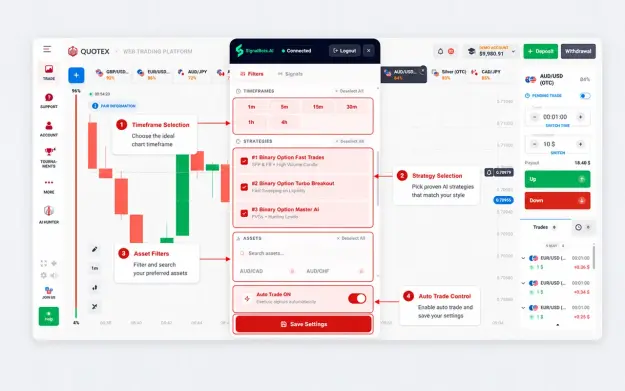
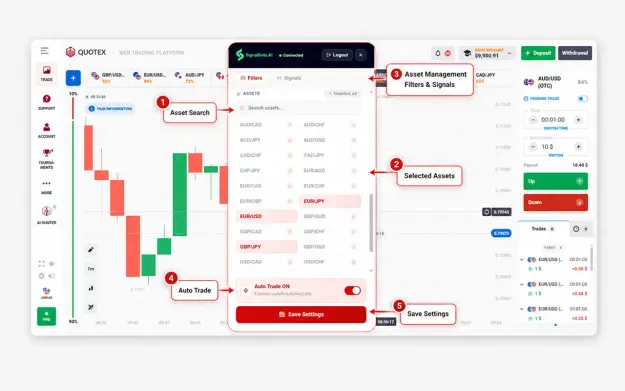
The popup lets you toggle the specific pairs, indices, commodities, and crypto assets you want the bot to act on for that session. Assets left off the watchlist are invisible to the signal engine entirely — not filtered and logged, just excluded. Adjust the watchlist at any point without interrupting the current session.
8. Six timeframes, switchable mid-session
M1 for high-frequency scalps. M5 for momentum entries with slightly more setup confirmation. M15 and M30 for broader context with fewer but more deliberate signals. H1 and H4 for high-conviction swing positions. All six are selectable from the popup at any time — your session state and signal log stay intact when you switch.
Market Coverage — 40+ Assets
Forex covers 28 pairs across all majors and crosses — EUR/USD, GBP/USD, USD/JPY, GBP/JPY, AUD/USD, USD/CAD, USD/CHF, EUR/JPY, EUR/GBP, GBP/AUD, NZD/USD, and the complete grid of minor pair combinations.
Indices cover seven of the most actively traded global benchmarks: S&P 500, Dow Jones, US 100, FTSE 100, CAC 40, Euro Stoxx 50, and Nikkei 225.
Commodities cover the four core markets: Gold (XAU/USD), Silver, Brent Crude Oil, and WTI Crude Oil.
Crypto coverage includes Bitcoin (BTC/USD).
Pricing
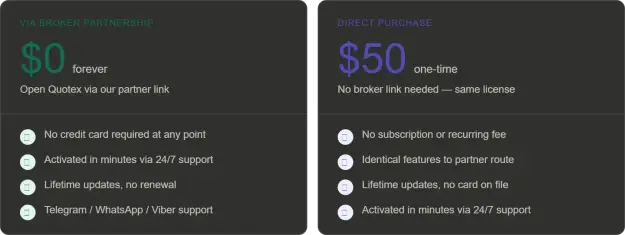
The free route works by opening your Quotex account through the SignalBots broker partnership link. The license is activated at no cost, with no credit card required and no recurring charge. The direct purchase is a one-time $50 payment — same license, same features, same lifetime update stream. Both options are activated by their 24/7 support team via Telegram, WhatsApp, or Viber, typically within minutes.
Getting Started — Three Steps
Step 1 — Connect your Quotex account New account takes around 30 seconds to open. Existing accounts attach directly without re-registration.
Step 2 — Install the extension One click from the Chrome Web Store or Firefox Add-ons page. Desktop browsers only — Chrome, Chromium-based browsers (Edge, Brave, Opera), and Firefox.
Step 3 — Activate your license Message their 24/7 support team. Via the broker partnership route it is free. Via direct purchase it is $50 one-time. Both activate within minutes.
Full Specifications
Quotex OTC — A Separate Extension
The Quotex Trading Bot covers real-market instruments during standard weekday sessions. Quotex OTC synthetic pairs — which run 24/7 including weekends — are handled by a separate OTC-specific extension that SignalBots also offers. The two are independent installs with different signal engines. If you trade OTC instruments, you need the OTC version; if you trade standard markets, this is the one.
Risk disclosure: Fixed-time and binary options trading involves a high level of risk and is not suitable for all traders. Backtested strategy win rates reflect historical performance under specific market conditions and do not guarantee future results. Automated execution tools act on pre-set logic and cannot adapt to breaking news, sudden liquidity events, or real-time payout changes at the broker level. Always test on a demo account before deploying real capital.
Every fixed-time trade on Quotex has an expiry clock attached to it. Miss the entry window by a second and the setup is gone — the payout has shifted, the candle has moved, and placing the order now means entering on different terms than the ones that made the setup valid. Speed is not a secondary concern on this platform. It is the primary constraint.
The Quotex Trading Bot by SignalBots is built around that constraint. It is a browser extension — compatible with Chrome, Firefox, Edge, Brave, Opera, and all major desktop browsers — that attaches a live AI panel directly to your open Quotex tab. From there it monitors price tick by tick, filters signals through three algorithmic strategies and a configurable payout floor, and executes CALL or PUT orders in under 10 milliseconds. You choose whether trades fire automatically or appear for your manual confirmation first.
There is no external platform to log into. No broker password required. No separate trading terminal. The panel opens when your Quotex tab opens and goes quiet when you close it.
How It Works
Installation connects the extension to your Quotex session automatically. No setup wizard, no configuration step — the panel slides in from the right side of your tab and begins streaming signals immediately. The engine underneath runs a continuous evaluation loop:
- Price prints tick by tick on the live Quotex chart
- Each tick is scored against whichever strategies you have active
- Signals that clear your payout floor are queued for execution or manual review
- Orders fire in under 10ms — evaluated locally, with no server round-trip
That last point is what separates local execution from cloud-based signal tools. A cloud service sends your chart data to a remote server, processes it, and returns a signal — introducing latency at every step. The Quotex Trading Bot processes everything on your own machine, inside the browser tab where Quotex is already running.
Three Strategies
Attached Image (click to enlarge)
Each strategy is independently backtested and optimized for different session conditions. Switch between them mid-session with one click — the panel does not restart and the signal log carries over.
Eight Features Built Into the Panel
1. Under-10ms local execution
The reaction time numbers tell the story directly: manual click averages 300ms, cloud-based bots average 80ms, the Quotex Trading Bot reacts in under 10ms. That gap exists entirely because evaluation runs locally. On a fast-moving M1 chart, 290ms is the difference between entering on the open and chasing a candle that has already run.
2. Minimum payout floor
Before any signal reaches the panel, it is checked against a minimum return rate you set. The default is 80%. Signals below that floor are rejected and written to the log with the reason. During Asian session hours when Quotex payouts on many pairs tend to compress, this filter works silently in the background — skipping setups that would not clear the math rather than presenting them for you to reject manually.
3. Full signal log with skip reasons
Every signal the bot evaluates shows up in the log — executed, filtered, or skipped — tagged with the exact reason. Low payout. Account mismatch. Strategy inactive for that asset. Timeframe excluded. The log is a session-level audit trail that tells you not just what the bot traded, but what it chose not to trade and why.
4. Demo and live — one toggle, identical behavior
Flip between demo and live mode from the popup. Strategies, filters, signal log, and auto-trade settings are identical in both modes. What you observe and validate on the demo balance is exactly what will run on your live account — no behavioral differences, no hidden logic gap between modes.
5. Account Mismatch Guard
Your license is bound to a single Quotex account ID. If you switch to a different Quotex account in the same browser, the panel raises a mismatch alert immediately and disarms all auto-trade execution until the licensed account is active again. Placing an order on the wrong account is structurally prevented, not just warned against.
6. Auto-reconnect on feed drop
If the Quotex feed disconnects — a Wi-Fi hiccup, a tab reload, a brief broker-side outage — the extension retries automatically. The popup banner updates in real time: Connected → Connecting → Connected. No manual re-login, no lost session, no need to reconfigure filters after reconnection.
7. Per-session asset watchlist
The popup lets you toggle the specific pairs, indices, commodities, and crypto assets you want the bot to act on for that session. Assets left off the watchlist are invisible to the signal engine entirely — not filtered and logged, just excluded. Adjust the watchlist at any point without interrupting the current session.
8. Six timeframes, switchable mid-session
M1 for high-frequency scalps. M5 for momentum entries with slightly more setup confirmation. M15 and M30 for broader context with fewer but more deliberate signals. H1 and H4 for high-conviction swing positions. All six are selectable from the popup at any time — your session state and signal log stay intact when you switch.
Market Coverage — 40+ Assets
Forex covers 28 pairs across all majors and crosses — EUR/USD, GBP/USD, USD/JPY, GBP/JPY, AUD/USD, USD/CAD, USD/CHF, EUR/JPY, EUR/GBP, GBP/AUD, NZD/USD, and the complete grid of minor pair combinations.
Indices cover seven of the most actively traded global benchmarks: S&P 500, Dow Jones, US 100, FTSE 100, CAC 40, Euro Stoxx 50, and Nikkei 225.
Commodities cover the four core markets: Gold (XAU/USD), Silver, Brent Crude Oil, and WTI Crude Oil.
Crypto coverage includes Bitcoin (BTC/USD).
Pricing
Attached Image (click to enlarge)
The free route works by opening your Quotex account through the SignalBots broker partnership link. The license is activated at no cost, with no credit card required and no recurring charge. The direct purchase is a one-time $50 payment — same license, same features, same lifetime update stream. Both options are activated by their 24/7 support team via Telegram, WhatsApp, or Viber, typically within minutes.
Getting Started — Three Steps
Step 1 — Connect your Quotex account New account takes around 30 seconds to open. Existing accounts attach directly without re-registration.
Step 2 — Install the extension One click from the Chrome Web Store or Firefox Add-ons page. Desktop browsers only — Chrome, Chromium-based browsers (Edge, Brave, Opera), and Firefox.
Step 3 — Activate your license Message their 24/7 support team. Via the broker partnership route it is free. Via direct purchase it is $50 one-time. Both activate within minutes.
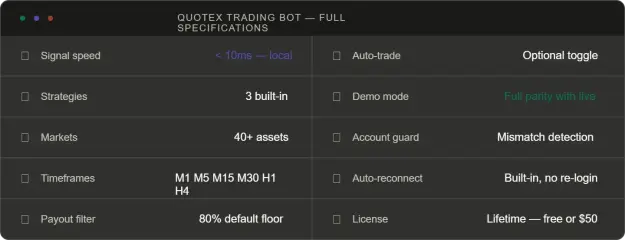
Full Specifications
Attached Image (click to enlarge)
Quotex OTC — A Separate Extension
The Quotex Trading Bot covers real-market instruments during standard weekday sessions. Quotex OTC synthetic pairs — which run 24/7 including weekends — are handled by a separate OTC-specific extension that SignalBots also offers. The two are independent installs with different signal engines. If you trade OTC instruments, you need the OTC version; if you trade standard markets, this is the one.
Risk disclosure: Fixed-time and binary options trading involves a high level of risk and is not suitable for all traders. Backtested strategy win rates reflect historical performance under specific market conditions and do not guarantee future results. Automated execution tools act on pre-set logic and cannot adapt to breaking news, sudden liquidity events, or real-time payout changes at the broker level. Always test on a demo account before deploying real capital.
Attached Image (click to enlarge)
Attached Image (click to enlarge)
Attached Image (click to enlarge)
Attached Image (click to enlarge)
Attached Image (click to enlarge)
SignalBots.AI