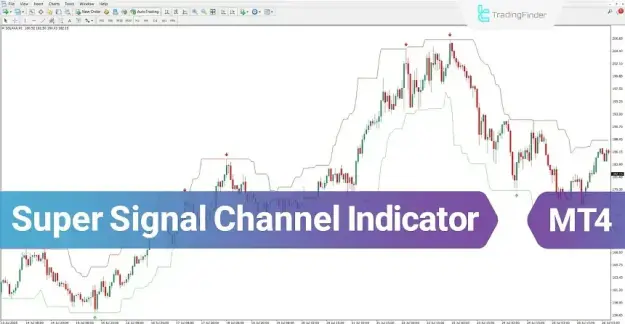
Beyond signal generation, this tool forms a dynamic price channel using two boundary lines, typically displayed in green and red. These lines act as critical zones for price interaction and can be effectively used to determine optimal take-profit and stop-loss levels.
 You can download it from this link:
https://cdn.tradingfinder.com/file/5...4-by-tflab.zip
 For instructions on how to install:
https://www.forexfactory.com/thread/...-in-metatrader
Prop Firm DrawDown Protector : Prop Firm Capital Protection Expert MT4 | Forex Money Management: Forex Trade Management Expert MT4 |ICT Concepts Indicator MT4 | Smart Money Concepts Expert MT4| Smart Money Trap Scanner | Get a free Expert Advisor license via Telegram and WhatsApp
Key Specifications of the Super Signal Channel Indicator
The Super Signal Channel indicator is structured with the following characteristics:
- Indicator Categories:
- Signal & Forecast MT4 Indicators
- Bands & Channels MT4 Indicators
- Levels MT4 Indicators
- Platform Compatibility:
- MetaTrader 4
- Trading Skill Level:
- Beginner-friendly
- Indicator Type:
- Reversal Indicator
- Timeframe:
- Multi-Timeframe capability
- Trading Styles:
- Day Trading
- Scalping
- Swing Trading
- Supported Markets:
- Forex
- Cryptocurrency
- Equities
Super Signal Channel Indicator Overview
This indicator improves chart readability by plotting directional arrows that highlight potential trading opportunities:
- Green arrows: Represent buy (long) signals
- Red arrows: Represent sell (short) signals
These signals are generated through the interaction of price with the channel structure and the indicator’s internal logic, offering a clear and organized framework for identifying entry and exit points.
Buy Signal Strategy
Identifying Buy Opportunities
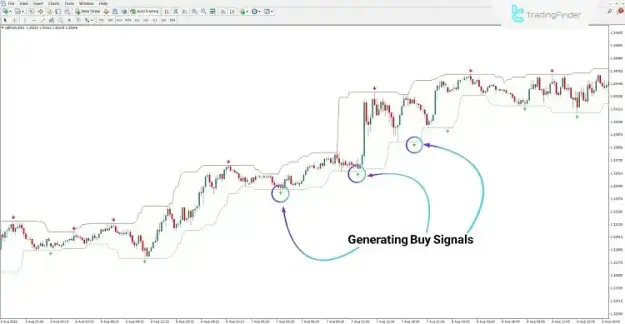
Under bullish market conditions, buy signals are indicated by green arrows. For example, on a GBP/USD chart in the 15-minute timeframe:
- A green arrow suggests a potential entry for a buy position
- Traders may open a long trade at the signal point
- Stop-loss levels are typically placed below the lower channel boundary
- Confirming the prevailing trend is recommended prior to execution
Application in Uptrend Conditions
- Buy signals are aligned with upward market momentum
- The lower boundary of the channel acts as dynamic support
- Price pullbacks toward this level may provide additional confirmation for entry
Sell Signal Strategy
Identifying Sell Opportunities
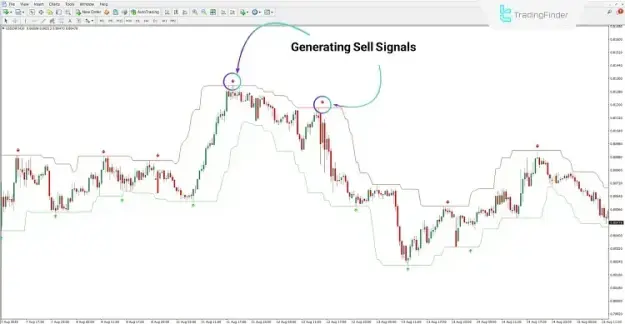
In bearish conditions, the indicator highlights sell signals using red arrows. For instance, on a USD/CHF chart in the 30-minute timeframe:
- A red arrow indicates a potential short entry
- Traders may initiate a sell position at the signal level
- Stop-loss levels can be set above the upper channel boundary
- Evaluating the broader market trend is essential before execution
Application in Downtrend Conditions
- Sell signals correspond with downward price movement
- The upper channel boundary acts as dynamic resistance
- Retracements toward this level can strengthen trade confirmation
Super Signal Channel Indicator Settings
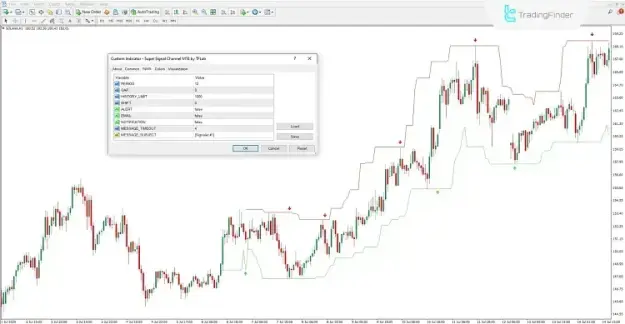
The indicator provides several adjustable parameters to suit different trading approaches:
- PERIOD: Number of periods used in calculations
- GAP: Distance between price and channel boundaries
- HISTORY_LIMIT: Number of past candles included in analysis
- SHIFT: Adjusts signal positioning on the chart timeline
- ALERT: Enables or disables alerts
- EMAIL: Activates email notifications
- NOTIFICATION: Enables push notifications
- MESSAGE_TIMEOUT: Controls the interval between alerts
- MESSAGE_SUBJECT: Defines the alert heading
Conclusion
The Super Signal Channel indicator serves as a reliable tool for detecting trend reversals and identifying precise entry and exit points across financial markets. By combining visual signal arrows with a dynamic channel structure, it offers a clear and methodical approach to market analysis.
This indicator can be effectively integrated into various trading strategies, enhancing analytical accuracy and supporting informed decision-making across multiple timeframes and trading instruments.