Traders can integrate these signals with their analysis of overall market conditions and their personal trading strategy to execute trades with enhanced precision at the indicated levels.
 You can download it from this link:
https://cdn.tradingfinder.com/file/5...5-by-tflab.zip
 You can also access the MetaTrader 4 version of this Indicator through this page:
https://www.cryptocraft.com/thread/1...atrader-4-free
 For instructions on how to install:
https://www.forexfactory.com/thread/...-in-metatrader
Prop Firm DrawDown Protector : Prop Firm Capital Protection Expert MT5 |Forex Money Management: Forex Trade Management Expert MT5 | ICT Concepts Indicator MT5 |Smart Money Concepts Expert MT5 | Smart Money Trap Scanner | Get a free Expert Advisor license via Telegram and WhatsApp
Core Functionality and Signal Types
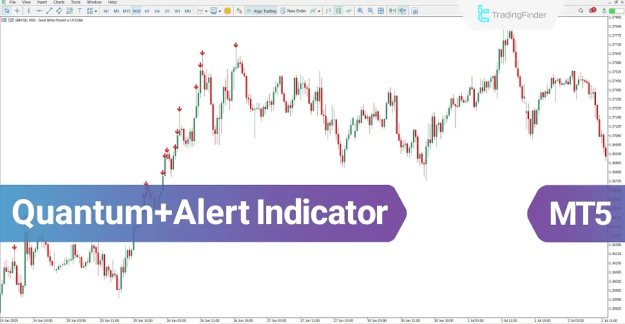
This indicator scans the market to pinpoint probable price reversal zones. These zones are then prominently marked on the chart using intuitive, colored arrows:
- Blue Arrow: Signals a potential bullish pivot point, suggesting a buying opportunity or the start of an upward price movement.
- Red Arrow: Signals a potential bearish pivot point, suggesting a selling opportunity or the start of a downward price movement.
Trading Applications Across Market Conditions
Uptrend Scenario Analysis
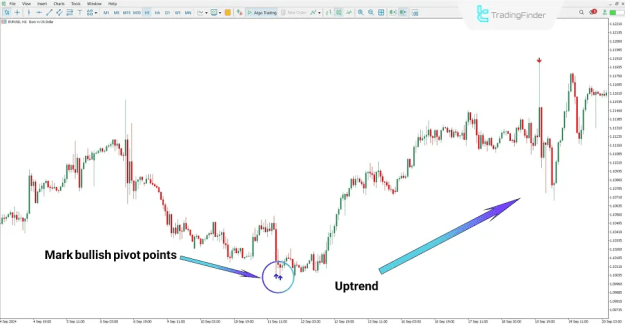
In an uptrend, as exemplified on an EUR/USD 1-hour chart, the Quantum with Alert indicator marks potential support and pivot zones with blue arrows. Historical analysis shows that price often reverses precisely from these highlighted areas, confirming the shift into a sustained uptrend. This allows traders to identify optimal moments to enter long positions.
Downtrend Scenario Analysis
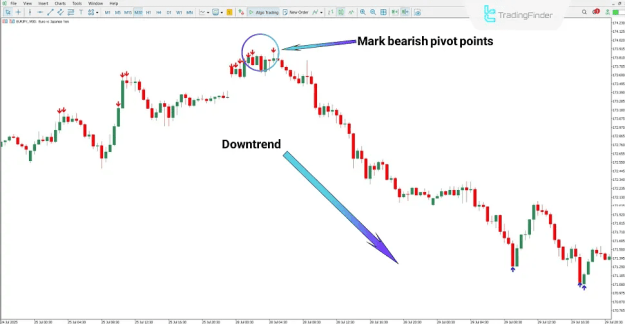
Conversely, in a downtrend, observable on timeframes like an EUR/JPY 30-minute chart, the indicator identifies resistance and reversal zones. Following the appearance of red arrows, the market trend frequently shifts into a downtrend. In such scenarios, traders aligned with the signal can consider opening short positions based on their strategic approach.
Quantum with Alert Indicator: Technical Specifications
Indicator Classification
- Pivot Points & Fractals MT5 Indicators
- Signal & Forecast MT5 Indicators
- Reversal MT5 Indicators
- Multi-Timeframe MT5 Indicators
Recommended Trading Skills
- Intermediate
Compatible Trading Styles
- Swing Trading MT5 Indicators
- Scalper MT5 Indicators
- Day Trading MT5 Indicators
Supported Trading Instruments
- Forex MT5 Indicators
- Crypto MT5 Indicators
- Stock MT5 Indicators
- Commodity MT5 Indicators
- Indices MT5 Indicators
- Share Stock MT5 Indicators
Platform
- MetaTrader 5
Configuring the Quantum with Alert Indicator
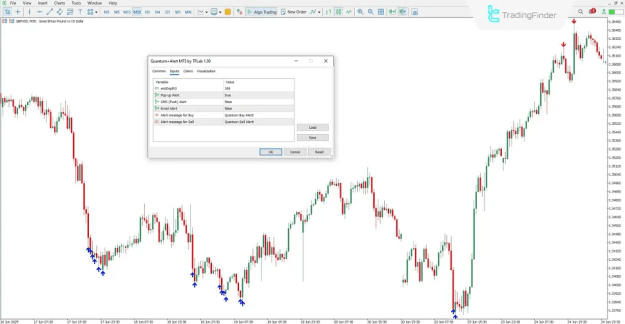
The settings panel of the Quantum with Alert Indicator in MetaTrader 5 allows for customization to fit individual trading preferences. Key configurable parameters include:
- EinDepth3: This setting controls the data depth used for the pivot point calculation, influencing the sensitivity and look-back period of the algorithm.
- Pop-up Alert: Enables or disables a visual pop-up alert window on the trader's screen when a new buy or sell signal is generated.
- SMS (Push) Alert: Activates push notifications sent directly to a linked mobile device or terminal for real-time signal alerts.
- Email Alert: Configures the system to send an automatic email notification for each new trading signal.
- Alert message for Buy: Allows customization of the text message for buy signal alerts.
- Alert message for Sell: Allows customization of the text message for sell signal alerts.
Conclusion
The Quantum+Alert indicator serves as a powerful tool for detecting market reversal points and pivot points, efficiently marking them with unambiguous arrow signals on the chart.
A standout feature is its comprehensive smart alert system. This system ensures traders never miss a potentially favorable buy or sell opportunity by delivering instant notifications through multiple channels: pop-up alerts, push notifications, and email alerts. This combination of clear visual signals and proactive alerts makes it a valuable addition for intermediate to advanced traders operating across Forex, Crypto, Stocks, Commodities, and Indices on the MT5 platform.