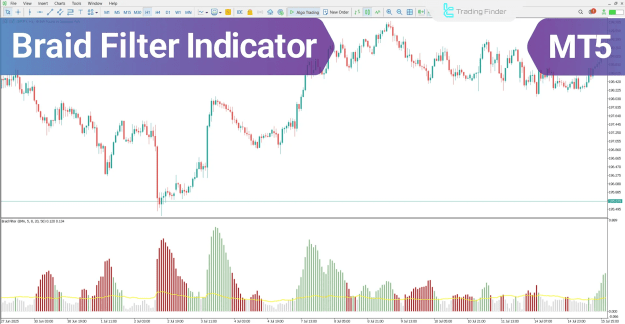
The combination of the colored histogram and the blue central filter line enables traders to recognize valid buy and sell zones with enhanced precision.
 You can download it from this link:
https://cdn.tradingfinder.com/file/5...5-by-tflab.zip
 You can also access the MetaTrader 4 version of this Indicator through this page:
https://www.cryptocraft.com/thread/1...tatrader-4-mt4
 For instructions on how to install:
https://www.forexfactory.com/thread/...-in-metatrader
Prop Firm DrawDown Protector : Prop Firm Capital Protection Expert MT5 |Forex Money Management: Forex Trade Management Expert MT5 | ICT Concepts Indicator MT5 |Smart Money Concepts Expert MT5 | Smart Money Trap Scanner | Get a free Expert Advisor license via Telegram and WhatsApp
Braid Filter Indicator Overview
The following sections describe the core categories and functional characteristics of the Braid Filter indicator:
- Indicator Categories
- Oscillators MT5 Indicators
- Trading Assist MT5 Indicators
- Momentum Indicators in MT5
- Platforms
- MetaTrader 5 Indicators
- Trading Skills
- Elementary
- Indicator Type
- Reversal MT5 Indicators
- Timeframe
- Multi-Timeframe MT5 Indicators
- Trading Style
- Intraday MT5 Indicators
- Trading Instruments
- Forex MT5 Indicators
- Crypto MT5 Indicators
- Stock MT5 Indicators
- Commodity MT5 Indicators
- Indices MT5 Indicators
- Share Stock MT5 Indicators
Braid Filter Indicator at a Glance
In the histogram of the Braid Filter indicator, a blue horizontal line functions as the primary filter, separating valid from invalid trading zones.
The position and color of the histogram bars provide essential decision-making insights:
- Green bars above the blue filter line
→ Indicate buyer dominance and entry into a valid bullish trading zone. - Red bars below the filter line
→ Confirm sustained selling pressure and signal a suitable opportunity for entering a sell position.
Indicator Behavior in an Uptrend
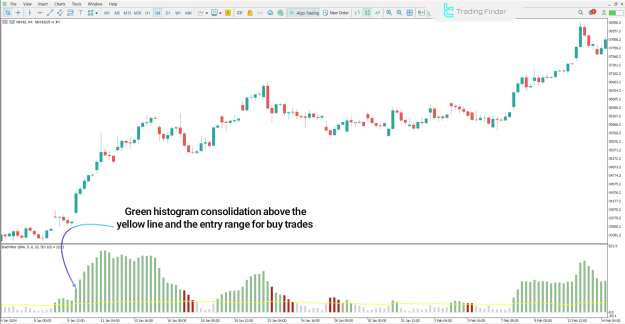
In the price chart example of the NIKKEI index on the H4 timeframe, the gradual rise of green histogram bars reflects a strengthening bullish trend and increasing market demand.
When these bars maintain their position above the blue filter line, a highly reliable zone is created, providing a strong indication for initiating buy positions.
Buy-Entry Zone in an Uptrend
- Rising green histogram bars
- Stable positioning above the filter line
- Confirmation of a strong bullish continuation pattern
Indicator Behavior in a Downtrend
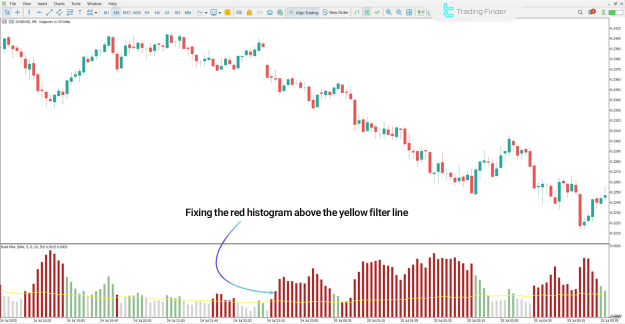
In the sample chart of the Dogecoin (DOGE/USD) index on the M5 timeframe, the increasing height of red histogram bars illustrates expanding selling pressure and intensifying bearish momentum.
Once the red bars stabilize below the blue filter line, a valid sell-entry zone emerges, confirming the continuation of the bearish trend.
Sell-Entry Zone in a Downtrend
- Strengthening red histogram bars
- Consistent placement below the filter line
- Reliable confirmation for short-selling opportunities
Braid Filter Indicator Settings
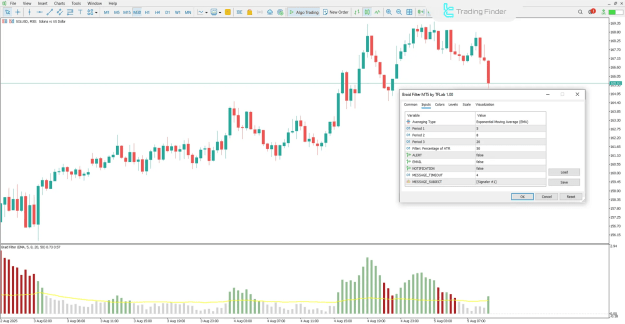
The settings panel of the Braid Filter indicator on the MetaTrader 5 platform includes the following adjustable parameters:
- MaPeriod1 – Period of the first moving average
- MaPeriod2 – Period of the second moving average
- MaPeriod3 – Period of the third moving average
- AtrPeriod – ATR calculation period
- PipsMinSepPercent – Minimum percentage distance between lines required for a valid signal
- ModeMA – Moving average type
- Alert – Enable audio alerts
- EMAIL – Send alerts via email
- Notification – Push notifications to mobile devices
- Message Timeout – Time interval between alert messages
- Message Subject – Title for alert notifications
Conclusion
The Braid Filter indicator is a highly practical technical analysis tool designed to detect market trends, highlight strong price movements, and eliminate weak or misleading signals. By utilizing a combination of multiple moving averages, a color-coded histogram, and a central filter line, this indicator effectively outlines optimal trade entry and exit zones, supporting traders in making more confident and accurate decisions.