You can download it from this link:
https://cdn.tradingfinder.com/file/5...4-by-tflab.zip
 You can also access the MetaTrader 5 version of this Indicator through this page:
https://www.cryptocraft.com/thread/1...ng-analysis-in
 For instructions on how to install:
https://www.forexfactory.com/thread/...-in-metatrader
Prop Firm DrawDown Protector : Prop Firm Capital Protection Expert MT4 | Forex Money Management: Forex Trade Management Expert MT4 |ICT Concepts Indicator MT4 | Smart Money Concepts Expert MT4| Smart Money Trap Scanner | Get a free Expert Advisor license via Telegram and WhatsApp
Gann Made Easy Indicator MT4
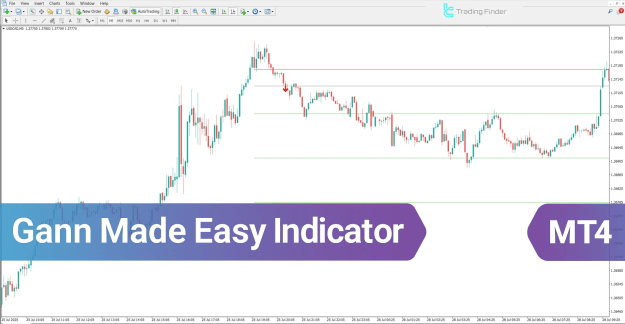
The Gann Made Easy Indicator for MetaTrader 4 (MT4) provides traders with essential analytical data to make informed and confident trading decisions. It offers accurate entry points, potential price targets, and precisely defined stop-loss levels for effective risk management.
Additionally, the indicator generates Buy/Sell signal alerts, displayed as green and red arrows, to help traders act at optimal market moments.
Key Features of the Gann Made Easy Indicator
The Gann Made Easy Indicator is categorized under multiple advanced MT4 indicator groups, designed for traders who prefer structured, automated, and rule-based market analysis.
Indicator Categories:
- Signal & Forecast MT4 Indicators
- Trading Assist MT4 Indicators
- Levels MT4 Indicators
Supported Platform: MetaTrader 4
Recommended Skill Level: Intermediate
Indicator Types:
- Breakout MT4 Indicators
- Reversal MT4 Indicators
Timeframe Compatibility: Multi-Timeframe
Trading Style: Intraday Trading
Applicable Instruments:
- Forex
- Stocks
- Cryptocurrencies
Gann Made Easy Indicator Overview
The Gann Made Easy Indicator automatically examines price highs and lows to determine whether the market trend is bullish or bearish. It then applies Gann angles, such as 1:1 and 2:1, to calculate key support and resistance levels.
Based on this analysis, the indicator plots entry, take-profit, and stop-loss levels directly on the chart.
Once predefined entry conditions are met, the indicator issues visual alerts in the form of green (buy) or red (sell) arrows to guide the trader toward well-timed decisions.
Indicator Performance in an Uptrend
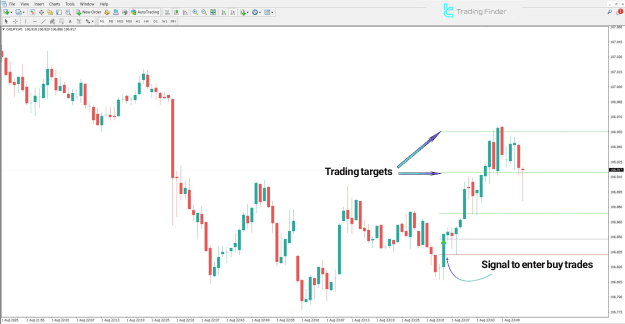
In an uptrend, after a resistance level is broken, the Gann Made Easy Indicator identifies a valid buy entry zone:
- The stop-loss is positioned just below the most recent swing low to minimize risk.
- Price targets are automatically projected using Gann ratios.
- As price approaches these targets, traders can secure profits progressively.
Example: On the CAD/JPY 1-minute chart, the indicator highlights a breakout level, confirming upward momentum consistent with Gann projections.
Indicator Performance in a Downtrend
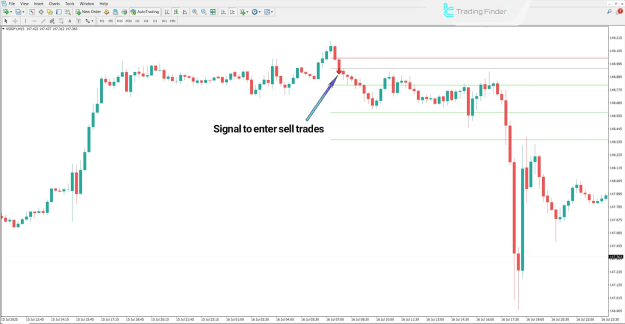
In a downtrend, once a support level is broken, the indicator generates a sell signal, represented by a red arrow:
- The stop-loss is placed slightly above the previous swing high.
- Take-profit levels are plotted at progressively lower Gann levels.
- Profits can be locked in at each level as the market continues to move downward.
Example: On the USD/JPY 15-minute chart, the Gann Made Easy Indicator clearly identifies trend reversal conditions and provides structured, step-by-step take-profit targets.
Gann Made Easy Indicator Settings
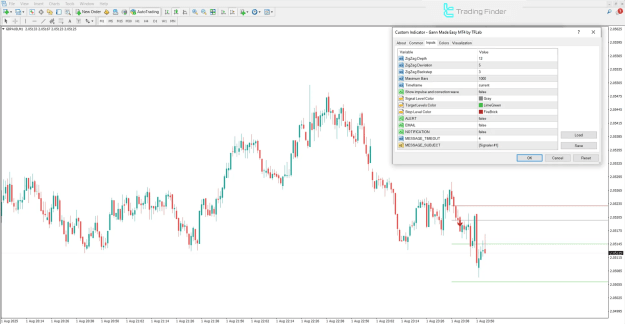
The settings panel of the Gann Made Easy Indicator on MT4 allows full customization for precision analysis and personal trading preferences.
Main Parameters:
- ZigZag Depth: Defines the sensitivity of the ZigZag formation.
- ZigZag Deviation: Adjusts the percentage deviation for accurate wave recognition.
- ZigZag Backstep: Controls the minimum spacing between swing points.
- Maximum Bars: Specifies the number of candles used in the indicator’s calculations.
- Timeframe: Displays or selects the desired chart timeframe.
- Show Impulse and Correction Wave: Enables visualization of both impulse and corrective phases.
- Signal Level Color: Customizes the color of entry signal levels.
- Target Levels Color: Adjusts the visual color for target price levels.
- Stop Level Color: Defines the color tone for stop-loss levels.
- ALERT: Activates or deactivates real-time on-screen alerts.
- EMAIL: Sends trading alerts directly to the user’s email.
- NOTIFICATION: Enables mobile push notifications for trade alerts.
- MESSAGE TIMEOUT: Sets the delay between consecutive alert messages.
- MESSAGE SUBJECT: Allows personalization of alert subject lines.
Conclusion
The Gann Made Easy Indicator for MetaTrader 4 streamlines the complex techniques of Gann analysis into a clear and structured format, helping traders identify market trends, entry zones, and exit points with precision.
By calculating Gann angles and plotting take-profit and stop-loss levels, it delivers a disciplined approach to trading.
When optimal trading conditions appear, the indicator automatically issues alerts — enabling traders to enter and exit positions efficiently while maintaining robust risk management and profit-taking strategies.