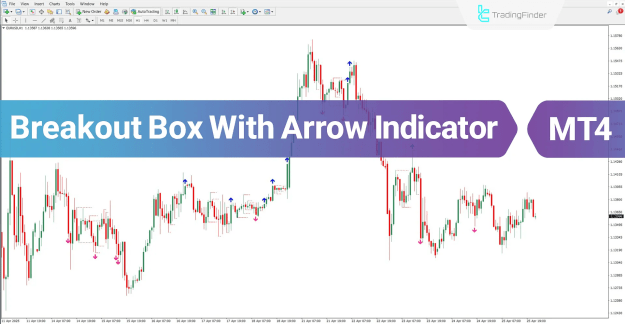
By analyzing user-defined input parameters, this technical analysis tool plots dynamic support and resistance levels above and below the current price. These levels are visualized as distinct boxes. A confirmed breakout from this box triggers a clear visual signal on the chart.
 You can download it from this link:
https://cdn.tradingfinder.com/file/3...4-by-tflab.zip
 For instructions on how to install:
https://www.forexfactory.com/thread/...-in-metatrader
TP & SL Tool: Risk Reward Ratio Calculator RRR MT4 | Prop Firm Protector: Trade Assist Prop Firm Plus TF Expert MT4 | Money Management + DrawDown Protector: Trade Panel Prop Firm Drawdawn Limiter Pro MT4 |Get a free Expert Advisor license via Telegram and WhatsApp
Technical Overview and Categorization
The Breakout Box indicator is a versatile tool that falls into several important categories for traders:
- Support & Resistance MT4 Indicators
- Signal & Forecast MT4 Indicators
- Levels MT4 Indicators
- Breakout MT4 Indicators
- Reversal MT4 Indicators
It is a multi-timeframe MT4 indicator, making it suitable for various trading styles and strategies, including:
- Scalper MT4 Indicators
- Day Trading MT4 Indicators
- Swing Trading MT4 Indicators
Trading Signals: Buy and Sell Alerts
The core functionality of this indicator is to generate precise trading signals using unambiguous arrow markers.
Buy Signal Identification
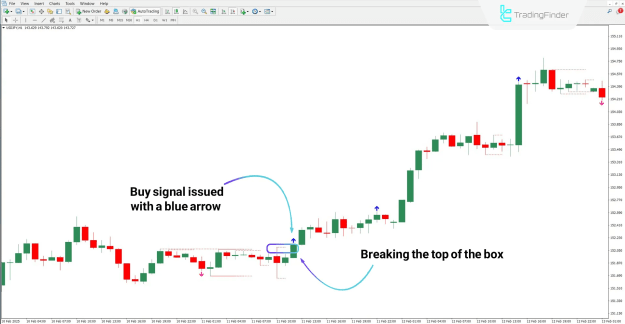
- A buy signal is generated when the market price breaks above the upper boundary of the defined box.
- This bullish breakout is confirmed by a candle closing outside the range.
- The indicator instantly plots a blue arrow on the chart, signaling a buying opportunity and suggesting an optimal entry point for a long trade.
Sell Signal Identification
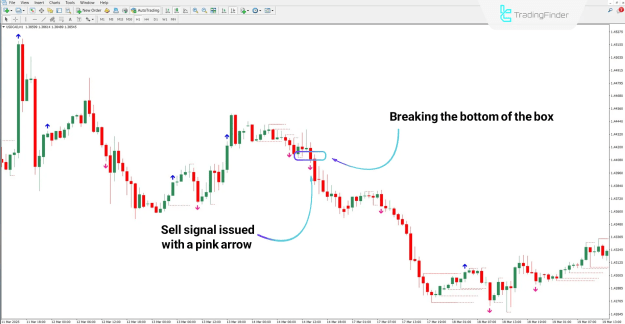
- A sell signal is triggered when the market price breaks below the lower boundary of the defined box.
- This bearish breakout is confirmed by a candle closing below the range.
- The indicator promptly displays a pink arrow on the chart, issuing a sell entry signal and indicating a potential point to initiate a short position.
Configuring the Breakout Box with Arrow Indicator
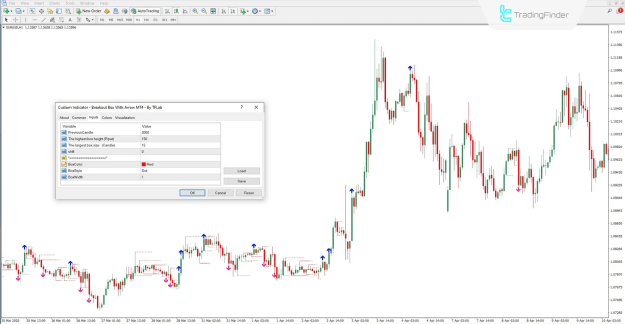
The indicator's behavior and visual presentation can be fully customized through its settings panel. Key adjustable parameters include:
- PreviousCandle: Determines the candle used for calculating the box's range.
- The largest box size (Candle): Defines the width of the box based on a number of previous candles.
- The highest box height (Pipet): Sets the maximum height of the box in pipets.
- Shift: Allows the user to shift the entire indicator forward or backward by a specified number of candles.
- BoxColor, BoxStyle, Box Width: Controls the visual appearance (color, style, and thickness) of the box lines.
Conclusion
The Breakout Box with Arrow indicator effectively pinpoints significant price zones by dynamically drawing horizontal lines based on recent highs and lows. Its primary strength lies in its ability to provide clear, actionable signals upon a confirmed breakout from these zones.
This indicator serves as an essential practical tool for technical analysis and demonstrates high compatibility when integrated with a wide range of other trading strategies.