You can access the Indicator from this link:
https://tradingfinder.com/products/i...monic-pattern/
You can access the Indicator on the TradingView website:
https://www.tradingview.com/script/u...tor-Indicator/
Prop Firm DrawDown Protector : Prop Firm Capital Protection Expert MT5 |Forex Money Management: Forex Trade Management Expert MT5 | ICT Concepts Indicator MT5 |Smart Money Concepts Expert MT5 | Smart Money Trap Scanner | Get a free Expert Advisor license via Telegram and WhatsApp
Key Features and Applications
This indicator is a highly effective tool for traders of various skill levels, particularly those with intermediate knowledge of technical analysis.
Indicator Specifications:
- Categories: This indicator is classified under Signal & Forecast, Harmonic Trading, and Chart & Classic indicators.
- Platform: It is specifically built for the TradingView platform.
- Trading Skills: The indicator is most suitable for traders with an intermediate level of skill.
- Indicator Type: It functions as a Reversal indicator, signaling potential trend changes.
- Timeframe: It is a Multi-Timeframe tool, adaptable for use on various chart periods.
- Trading Style: The indicator is ideal for Day Trading.
- Instruments: It can be applied across a wide range of instruments, including Forex, Cryptocurrency, Stocks, and Futures.
Trading with the Shark Harmonic Pattern
The Shark Harmonic Pattern is instrumental in identifying market reversals and providing actionable trading signals.
Bullish Shark Pattern in an Uptrend
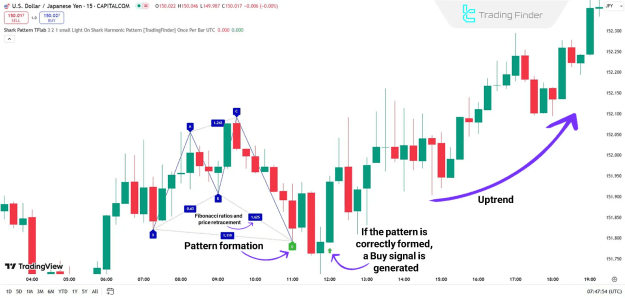
In an uptrend, as seen on a 15-minute USD/JPY chart, the Shark Harmonic Pattern indicates a potential upward movement. After the price corrects from point B to C, it reaches the Potential Reversal Zone (PRZ). This reversal is typically confirmed by a bullish confirmation candle, prompting a buy signal (represented by a green arrow). Traders can then enter a long position near the PRZ and place their stop loss below point D to manage risk.
Bearish Shark Pattern in a Downtrend
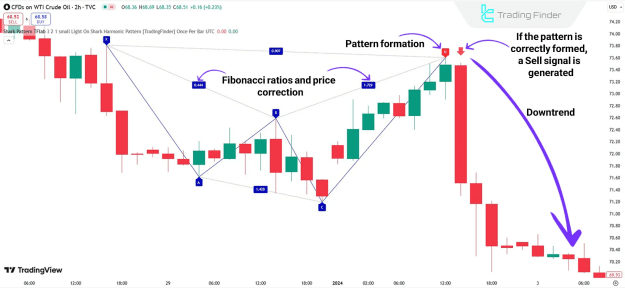
Conversely, in a downtrend, such as on a 2-hour WTI crude oil chart, the price corrects from point B to C, reaches the PRZ, and initiates a downward move. This reversal is accompanied by a sell signal (represented by a red arrow) and a decrease in buying pressure. This provides an excellent opportunity for traders to enter a short position near the PRZ.
Customizing the Indicator Settings
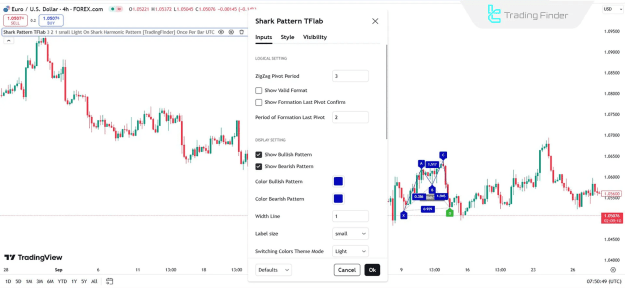
The Shark Harmonic Pattern indicator offers extensive customization to align with different trading strategies. The settings are typically divided into three main sections:
Logical Settings
- ZigZag Pivot Period: Adjusts the calculation of pivot points.
- Show Valid Format: Toggles the display of confirmed patterns.
- Show Formation Last Pivot Confirm: Enables or disables the confirmation display for the last pivot.
Display Settings
- Show Bullish/Bearish Pattern: Enables or disables the display of bullish and bearish patterns.
- Color Bullish/Bearish Pattern: Allows for customization of the pattern's colors.
- Width Line: Adjusts the thickness of the pattern lines.
- Label Size: Controls the size of the text labels.
Alert Settings
- Alert: Activates notifications when a new pattern forms.
- Alert Name: Allows for a custom name for the alert.
- Message Frequency: Determines how often alert messages are sent.
- Show Alert Time by Time Zone: Displays the alert time based on a specific time zone.
Conclusion
The Shark Harmonic Pattern Indicator is an indispensable tool for traders who utilize harmonic analysis. By automatically identifying key Fibonacci relationships and marking Potential Reversal Zones (PRZs) on a chart, it simplifies the process of finding high-probability trade setups. The indicator's ability to provide clear entry signals and its wide range of customizable settings make it a valuable asset for any trader seeking to enhance their market analysis.