You can access the indicator from this link:
https://tradingfinder.com/products/i...wing-screener/
You can access the indicator on the TradingView website:
https://www.tradingview.com/script/9...TradingFinder/
Prop Firm DrawDown Protector : Prop Firm Capital Protection Expert MT4 | Smart Money Trap Scanner | Forex Money Management: Forex Trade Management Expert MT4 |ICT Concepts Indicator MT4 | Smart Money Concepts Expert MT4| Get a free Expert Advisor license via Telegram and WhatsApp
Key Components of the Sweep Swing Screener
The screener combines three essential elements of smart money trading:
- Market Structure: Detects swing highs and swing lows to identify structural break points.
- Liquidity Behavior: Recognizes liquidity accumulation areas typically targeted by stop hunts.
- Candle Confirmation: Confirms price rejection using specific candle patterns such as Doji or indecision candles.
Features and Use Cases
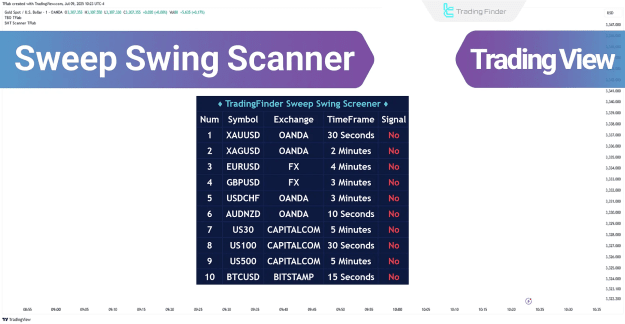
This advanced screener continuously scans charts and highlights zones where reversals are statistically more likely. It supports multi-timeframe analysis and is suitable for various trading instruments and styles.
Applicable Platforms and Instruments
- Platform: TradingView
- Trading Instruments: Forex, Cryptocurrency, Stocks, Commodities, Indices, Shares
- Trading Style: Intraday and Swing Trading
- Skill Level: Advanced traders
- Indicator Type: Reversal and Liquidity Sweep Indicator
- Category: ICT Indicators, Smart Money Concepts
Sweep Swing Screener – How It Works
Step 1 – Swing Point Identification
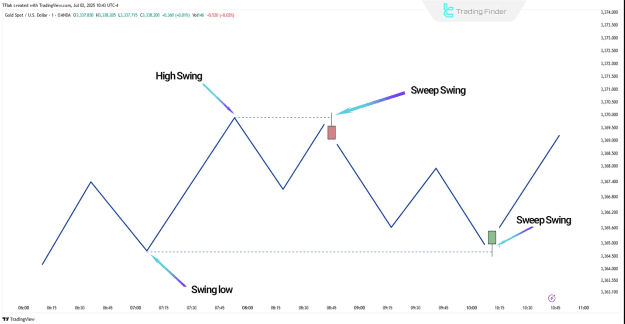
- The screener detects significant swing highs and lows, which are key levels where liquidity typically pools.
- These areas often correspond with trader stop-loss placements, making them prime zones for liquidity grabs.
Step 2 – Defining the Reaction Zone
- Upon identifying a swing level, the tool defines a Reaction Zone, which extends from the swing point to the highest (for highs) or lowest (for lows) open/close of the related candle.
- This zone serves as the reference area for evaluating future price reactions and signal generation.
Step 3 – Liquidity Sweep Analysis
- If the price returns to the reaction zone and briefly breaches the swing level, the screener checks whether the move is a true breakout or a liquidity sweep.
- This filtering process is crucial in eliminating false breakouts often caused by stop hunts.
Step 4 – Candle Confirmation and Signal Generation
- A valid reversal signal is confirmed only if the following conditions are satisfied:
- A clear liquidity sweep has occurred.
- The price closes back inside the reaction zone.
- The confirmation candle is an indecision or rejection candle (e.g., Doji).
- The time gap between the swing and confirmation candle is within the defined threshold (e.g., under 50 candles).
Bullish Setup Behavior
- A buy signal is triggered when:
- A valid swing low is formed.
- Price returns to the area and briefly breaks below the swing (liquidity sweep).
- The price then re-enters the zone and closes with a confirmation candle, indicating absorption of selling pressure.
- The screener then issues a buy alert if alerting is enabled.
Bearish Setup Behavior
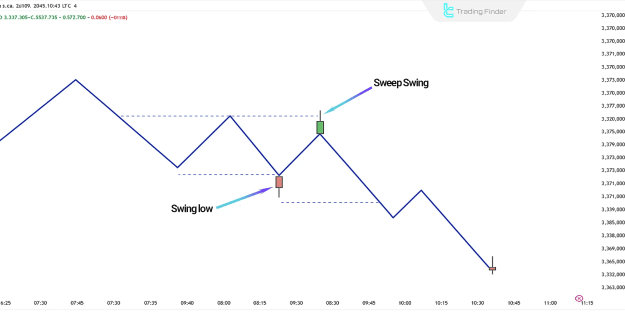
- A sell signal is triggered when:
- A valid swing high is formed.
- The price revisits the swing level and breaks above it temporarily (false breakout).
- The price then returns below the reaction zone, closing with an indecision or rejection candle.
- This action suggests failed bullish momentum and triggers a sell alert if configured.
Sweep Swing Screener – Settings Overview
The tool offers a range of customizable settings to align with different trading strategies and preferences.
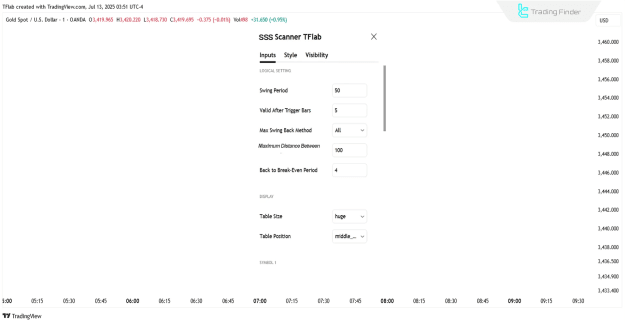
Logical Parameters
- Swing Period: Defines the interval for detecting swing points.
- Max Swing Back Method: Specifies the methodology for evaluating historical swings.
- Max Swing Back: Sets the number of candles to look back.
- Maximum Distance Between Swing and Signal: Controls the allowable gap between the swing point and confirmation candle.
Display Options
- Table Size: Adjusts the size of the on-chart display table.
- Table Position: Determines the location of the display table on the chart.
Symbol and Timeframe Settings
- Symbol: Selects the trading symbol or asset.
- Timeframe: Defines the chart timeframe used for analysis.
Alert Settings
- Alert Toggle: Enables or disables alert functionality.
- Message Frequency: Adjusts the frequency of alert messages.
- Time Zone Display: Allows the display of alert times according to selected time zones.
Conclusion
The Sweep Swing Screener is a powerful TradingView indicator developed for liquidity-based trading strategies. By integrating market structure analysis, liquidity sweep detection, and candlestick confirmation, it allows traders to:
- Accurately identify reversal zones,
- Avoid false breakouts,
- Generate high-probability entry and exit signals.
This tool is ideal for traders who follow ICT concepts, smart money principles, and liquidity-based trading frameworks.