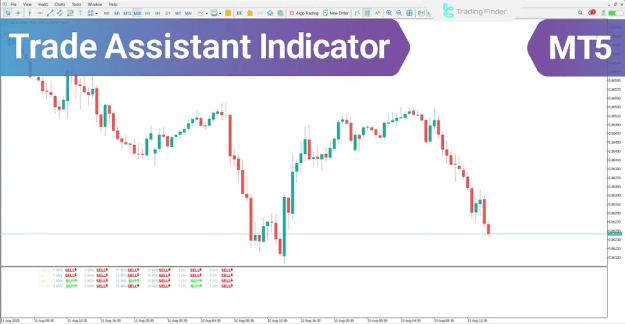
Primarily functioning as a real-time signal generator, this indicator is engineered to deliver rapid Buy and Sell alerts. It employs a multi-filter system to process market data and presents the findings across six distinct timeframes.
 You can download it from this link:
https://cdn.tradingfinder.com/file/5...5-by-tflab.zip
 You can also access the MetaTrader 4 version of this Indicator through this page:
https://www.cryptocraft.com/thread/1...atrader-4-free
 For instructions on how to install:
https://www.forexfactory.com/thread/...-in-metatrader
Prop Firm DrawDown Protector : Prop Firm Capital Protection Expert MT5 |Forex Money Management: Forex Trade Management Expert MT5 | ICT Concepts Indicator MT5 |Smart Money Concepts Expert MT5 | Smart Money Trap Scanner | Get a free Expert Advisor license via Telegram and WhatsApp
Trade Assistant Indicator Specifications
The fundamental characteristics and categorization of the Trade Assistant Indicator are outlined below:
- Indicator Categories: Signal & Forecast MT5 Indicators; Trading Assist MT5 Indicators.
- Supported Platforms: MetaTrader 5 (MT5).
- Target Trading Skills: Elementary to Advanced.
- Indicator Types: Reversal MT5 Indicators.
- Timeframe Capabilities: Multi-Timeframe (MTF) functionality.
- Trading Style: Intraday MT5 Indicators.
- Compatible Instruments: Forex, Cryptocurrency, and Stock Market assets.
Trade Assistant at a Glance
The Trade Assistant Indicator operates as a multi-layered analytical framework. It synchronizes three core momentum oscillators—the Relative Strength Index (RSI), Stochastic Oscillator, and Commodity Channel Index (CCI)—to evaluate market sentiment across various temporal scales.
The indicator processes data from each oscillator in parallel. It then populates a dedicated signal panel, categorizing the market status as Buy, Sell, or Neutral for every individual timeframe.
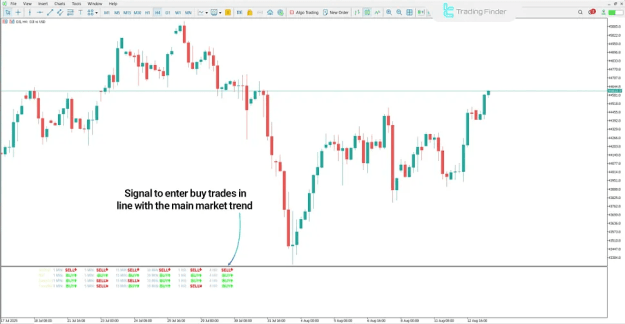
Indicator in an Uptrend
In a bullish market environment, the indicator identifies high-probability entry points through signal convergence. For instance, on a 4-hour (H4) chart of the Dow Jones Index (DJI), a valid bullish signal is confirmed when primary timeframes (such as H1 and H4) generate BUY signals simultaneously.
To validate this entry:
- All three integrated momentum oscillators must align to reflect positive market conditions.
- This convergence indicates robust market demand and provides a high-confidence entry for long positions.
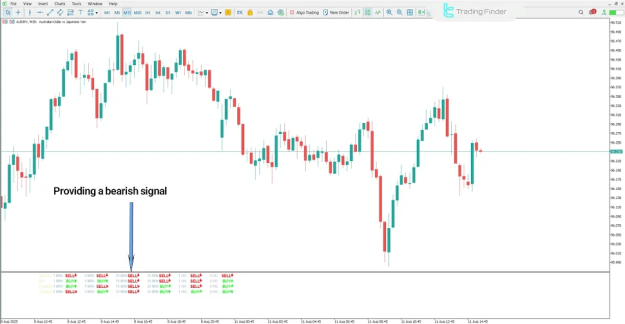
Indicator in a Downtrend
Conversely, in a bearish scenario—such as the AUD/JPY pair on a 15-minute (M15) timeframe—a valid sell signal occurs when key timeframes (e.g., M15, H1, and H4) provide SELL signals in unison.
The requirements for a bearish entry include:
- Confirmation of downward momentum from all three oscillators (RSI, Stochastic, and CCI).
- Evidence of increasing selling pressure and supply dominance, which confirms a valid short entry.
Indicator Settings
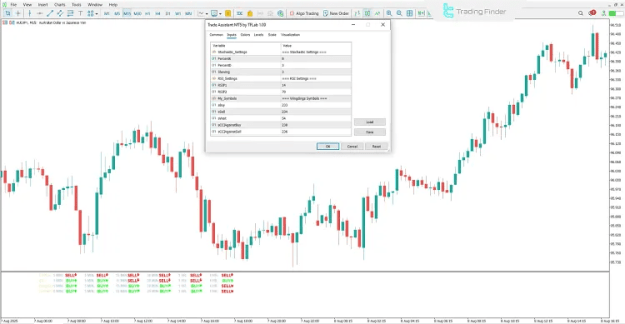
The configuration parameters for the Trade Assistant Indicator allow for extensive customization to suit specific trading strategies:
- Stochastic_Settings: Parameters for the Stochastic Indicator.
- PercentK: Period for the %K line.
- PercentD: Period for the %D line.
- Slowing: The smoothing factor applied to the stochastic data.
- RSI_Settings: Parameters for the Relative Strength Index.
- RSIP1: Primary RSI parameter.
- RSIP2: Secondary RSI parameter.
- My_Symbols: Allows users to define specific trading symbols for monitoring.
- Signal Labels:
- sBuy: Custom label for Buy signals.
- sSell: Custom label for Sell signals.
- sWait: Label for neutral or "Wait" status.
- Contrarian Signals:
- sCCIAgainstBuy: CCI signal suggesting a counter-trend move against a Buy.
- sCCIAgainstSell: CCI signal suggesting a counter-trend move against a Sell.
Conclusion
The Trade Assistant Indicator is a powerful utility for MetaTrader 5 that synthesizes RSI, Stochastic, and CCI oscillators for multi-timeframe market assessment. By presenting data through a clear signal panel, it assists traders in identifying market trends and neutral zones with ease. Furthermore, its capacity to detect signal convergence significantly enhances entry accuracy while filtering out market noise and false signals.