You can access the Indicator from this link:
https://tradingfinder.com/products/i...sessions-lite/
You can access the Indicator on the TradingView website:
https://www.tradingview.com/script/7...ia-NYSE-Forex/
Prop Firm DrawDown Protector : Prop Firm Capital Protection Expert MT5 |Forex Money Management: Forex Trade Management Expert MT5 | ICT Concepts Indicator MT5 |Smart Money Concepts Expert MT5 | Smart Money Trap Scanner | Get a free Expert Advisor license via Telegram and WhatsApp
Key Features and Functionality of Sessions Lite
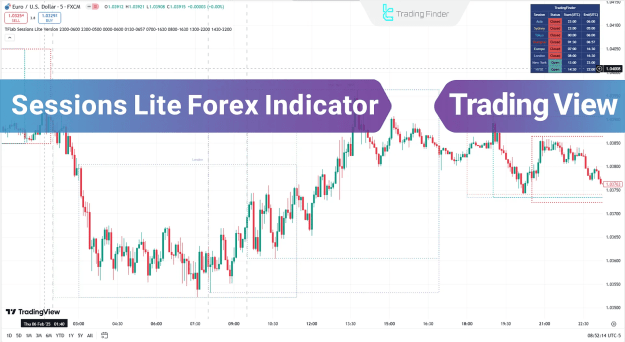
The indicator offers a clear visual representation of trading sessions, helping traders to effectively manage their analysis. A time panel in the chart's top right corner provides real-time information on market open and close times, along with the specific start and end times for each trading session.
Indicator Specifications:
- Categories: The Sessions Lite Indicator falls into several categories, including Supply & Demand, Trading Assist, and Session & KillZone indicators.
- Platform: It is exclusively designed for the TradingView platform.
- Trading Skills: This tool is suitable for traders with elementary to advanced skills.
- Indicator Types: It functions as a Range, Leading, and Non-Repaint indicator.
- Timeframe: It is a Multi-Timeframe indicator, adaptable to various chart periods.
- Trading Style: It is ideal for Intraday Trading, Day Trading, and Scalping.
- Instruments: The indicator can be used across multiple markets, including Forex, Indices, and Share Stocks.
Practical Applications in Trading
The Sessions Lite Indicator is a valuable resource for conducting an in-depth review of different trading sessions and performing specialized technical analysis.
Identifying Uptrends with Session Lite
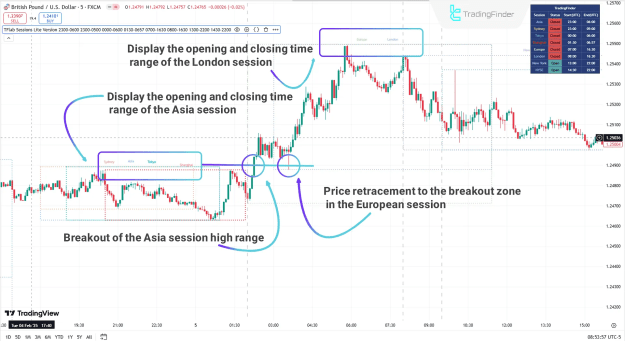
On a 5-minute GBP/USD chart, for example, the Sessions Lite Indicator will clearly mark the opening and closing times of the Asian session. After the price forms a high and low within this session, it may begin an uptrend and break above the Asian session's high. During the subsequent London session, the price often pulls back to retest the Asian session's high before continuing its upward movement. This breakout and retest pattern is a common and important signal for traders.
Analyzing Downtrends with Session Lite
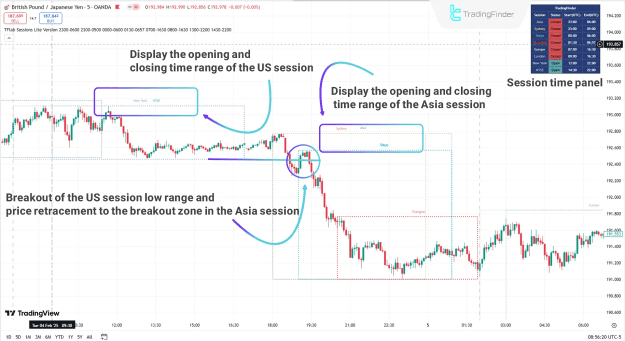
Similarly, on a 5-minute GBP/JPY chart, the indicator can highlight the U.S. session's open and close times. After a period of range-bound movement, the price may break below the U.S. session's low during the Asian session. Following this breakout, a pullback and retest of the broken level often occurs before the price enters a sustained downtrend. The session panel, located in the top left corner of the chart, allows traders to monitor the open/closed status of each session in real-time.
Customizing the Sessions Lite Indicator Settings
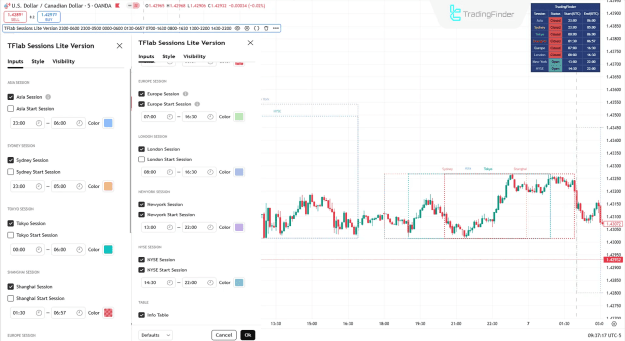
The indicator provides extensive customization options to suit individual trading strategies. Traders can adjust settings for each major session, including:
- Session Visibility: Enable or disable the display of specific sessions like the Asia, Europe, London, Sydney, New York, Tokyo, Shanghai, and NYSE sessions.
- Start Time Visibility: Show or hide the start of each session with a vertical line.
- Color Customization: Choose the desired color for each session's display box and vertical line.
The ability to customize these settings allows traders to focus on the sessions most relevant to their trading style and currency pairs.
Conclusion
The Sessions Lite Forex Indicator is an essential tool for session-based traders and anyone seeking to analyze and monitor the dynamics of global trading sessions. By visually representing session times and providing a clear, real-time status panel, it offers a distinct advantage for making informed trading decisions. The indicator's features help traders gain a clearer understanding of market behavior during different sessions, ultimately enhancing their analytical capabilities.