The Macro ICT KillZones Indicator is a professional tool designed for traders following the ICT (Inner Circle Trader) methodology. This free TradingView indicator helps identify critical market phases—known as Kill Zones—where price volatility and liquidity shifts create high-probability trading opportunities.
By highlighting key session times (London, New York) and detecting Fair Value Gaps (FVG), this indicator empowers traders to align their strategies with institutional market movements.
You can access the Indicator from this link:
https://tradingfinder.com/products/i...ict-killzones/
You can access the Indicator on the TradingView website:
https://www.tradingview.com/script/z...Trading-Setup/
Prop Firm DrawDown Protector : Prop Firm Capital Protection Expert MT5 |Forex Money Management: Forex Trade Management Expert MT5 | ICT Concepts Indicator MT5 |Smart Money Concepts Expert MT5 | Smart Money Trap Scanner |Get a free Expert Advisor license via Telegram and WhatsApp
Key Features of the ICT KillZones Indicator
1. Visual Kill Zone Detection
By highlighting key session times (London, New York) and detecting Fair Value Gaps (FVG), this indicator empowers traders to align their strategies with institutional market movements.
You can access the Indicator from this link:
https://tradingfinder.com/products/i...ict-killzones/
You can access the Indicator on the TradingView website:
https://www.tradingview.com/script/z...Trading-Setup/
Inserted Video
Prop Firm DrawDown Protector : Prop Firm Capital Protection Expert MT5 |Forex Money Management: Forex Trade Management Expert MT5 | ICT Concepts Indicator MT5 |Smart Money Concepts Expert MT5 | Smart Money Trap Scanner |Get a free Expert Advisor license via Telegram and WhatsApp
Key Features of the ICT KillZones Indicator
1. Visual Kill Zone Detection
- Displays colored zones on the chart, marking high-activity periods.
- Labels each Kill Zone with its session type (e.g., London Open, NY Lunch).
2. Flexible Time Zone Adjustments
- Supports UTC, local time, or New York time settings.
- Automatically adjusts for Daylight Saving Time (DST).
3. Fair Value Gap (FVG) & Liquidity Tracking
- Identifies price imbalances for potential reversals.
- Marks upper/lower bounds with dotted lines for breakout analysis.
4. Multi-Timeframe Compatibility
- Works on M1 to M30 charts, ideal for scalpers, day traders, and intraday traders.
- Adaptable to forex, crypto, and indices markets.
How to Trade with ICT KillZones
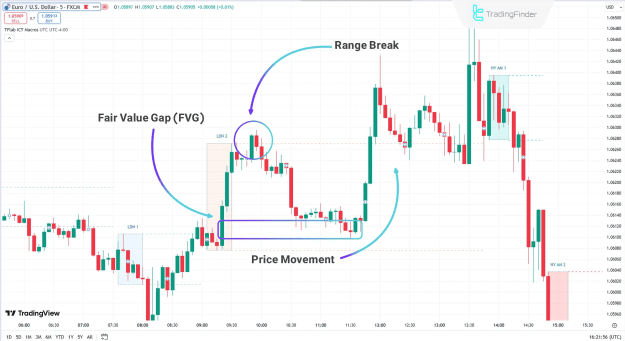
Example 1: EUR/USD 5-Minute Chart
- Price enters a Kill Zone, breaks through, and forms an FVG.
- On retesting the zone, a sharp reversal occurs—offering a high-probability entry.
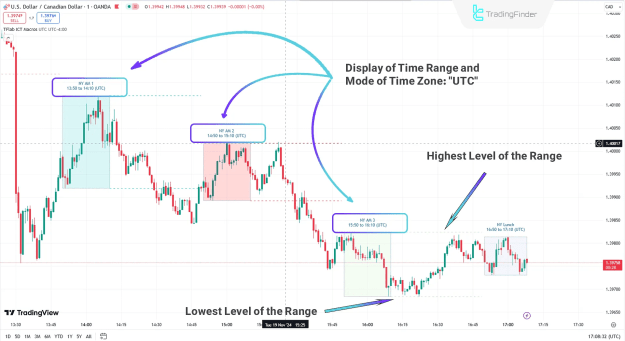
Example 2: USD/CAD 1-Minute Chart
- The indicator highlights New York Session Kill Zones (colored boxes).
- Traders use the boundary lines to pinpoint reversals or breakouts.
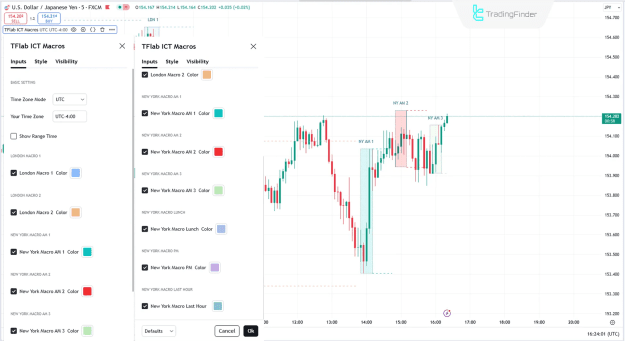
Optimizing the Indicator Settings
Customize the tool for your strategy:
- Time Zone Mode: Switch between UTC/local/NY time.
- Session Colors: Assign distinct colors to London/NY macros.
- Range Display: Toggle session timings for clarity.
Why Traders Need This Indicator
Aligns with Smart Money Concepts (SMC)
Pinpoints High-Volatility Phases
Enhances Entry/Exit Precision
Free & Easy-to-Use on TradingView
Final Thoughts
The ICT KillZones Indicator is a must-have for traders leveraging ICT strategies. By automating session tracking and FVG detection, it removes guesswork and sharpens timing.
Attached Image(s) (click to enlarge)